


Even though I have been a long time user of oh-my-zsh on zsh (moved from plain bash to zsh like 10 years ago), I have been very minimal on my use of its theme capabilities. I have used the default theme forever:
robbyrussell. But recently I was showing my friend @craftycoder the tweaks I have on my system (fzf, autojump, etc) and he showed me this theme, agnoster. It had several pieces I liked:- Powerline-style prompt
- Git status
- Virtualenv detection
What did I want to modify?
- Too long branch names. Looks very nice with
masterbut is a bit more troublesome withfeature/SAS-4028/kubernetes/poc - I don’t care that much about the path. Current directory is enough
- Usually I like knowing in which
gitproject I am in better
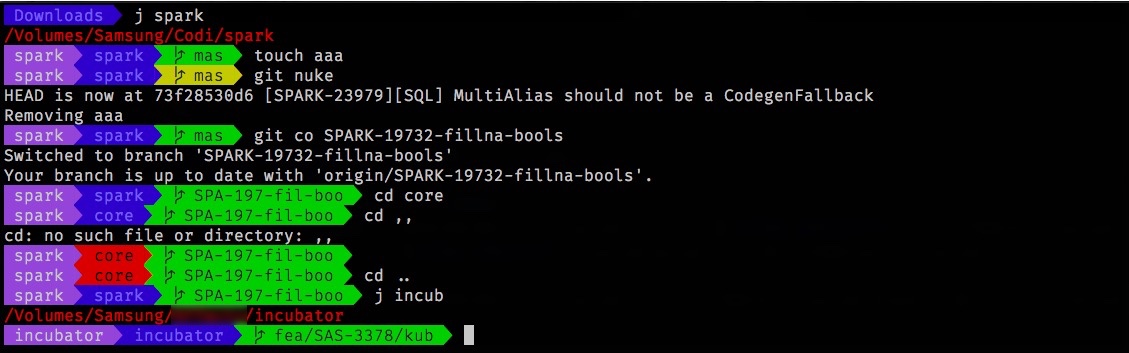
Path
I played around with several options to make the path look as I would like. I started with the shrink-path Zsh plugin, but I didn’t totally like how it looked. I cobbled together a bit ofawk to get 2 or 3 characters out of each piece of the path instead, it didn’t look much better but was taking much more space. Ended up with just current dir, this is excellent actually.Branch name
Paths at work are of the form{kind}/{ticket number}/{description}. I don’t want to know all the pieces. Kind is any of feature, hotfix (very rarely) or occasionally might be something else. It could be shortened to just a few letters. In general, I like seeing the full ticket number (no specific reason). I don’t need to know the full description, it can be shortened to 4 or 5 characters. Awk to the rescue. I love awk. With it I reduced the branch names to what I wanted, additionally I wrote a small checker that makes Spark’s style pull request naming also be shortened. You can check the awk approach here.Git project
Knowing the project and current folder is everything I need to know. If I need to know more, I justpwd.Error under last command, root, background processing
I don’t like my prompt to change shape. I changed the error reporting to switch colours of the current directory to red. And dropped background processes and root reporting, since I’m never root on my machine, and never run anything in the background unless it needs to be globally.User information
I’m usually pretty sure which user I am, so... Removed it, I prefer a shorter prompt if possible.Some helpers
I added a couple of helpers, reusing some of the code/ideas: jump to Github and jump to JIRA. You can see them in the repository.


