

Nombre de resultats 16
per a Mac
21/05/2019 - LSP for Python and Scala
If you have have known me for any length of time you'll know I write mostly Python and Scala lately (Rust is getting into the mix slowly). And you should know, I am a heavy
One problem of using
This is why I learnt how to set up GNU global, jump to definition is just too handy. Luckily, the people at Scala Center not only are smart, but also try to improve developer experience, and had been working in a language server for Scala for a while, called metals. I got it working recently, and it's great. You get documentation on hover, error messages, jump to definition. Oh, I forgot to mention, the language server protocol is an invention from Microsoft to standardise how editors handle language completions and all that. They probably introduced it for Visual Studio Code (I actually use it from time to time, it has some remote pair programming capabilities I'll talk someday), but now it's extending across all editors.
After using LSP in emacs for Scala for a while I decided to set it up for Python as well, in preparation for our next PyBCN podcast, about tools we use. I was pretty happy with the completions I was getting, but semantic completions from a language server are usually better. So far, lsp with python is ok. Oh, you'll see screenshots at the end!
You'll need to install the language server. I usually have a high level Python environment with all my tools, for things I am just starting to work on:
After this, some configuration is needed in
You can see how it looks now.
Sadly, inlined documentation doesn't look as good as it should: compare with Scala with metals and lsp-scala:
If you've gotten this far, I share my most interesting weekly readings in tag here . You can also get these as a weekly newsletter by subscribing here.


emacs user. I have been using emacs for close to 15 years, for the past 3 my emacs of choice has been spacemacs. I used to have a very long, customised and complex .emacs and with spacemacs I get a mostly-batteries-included package. That's nice after a while, and I also have gotten really proficient at using evil.One problem of using
emacs is the integration with some languages. If you write Scala, with IntelliJ you get super-fancy completion, refactoring, code analysis, jump-to-definition... Many goodies. In emacs, the best-in-class system used to be ensime. It worked, but it was not really supported for spacemacs (since I'm an old emacs user I could play around that), but the main issue was that my old MacBook was short on memory for running ensime and a lot more. So, I wrote most of my Scala code in hardcode mode. No completion, documentation or jump to definition. This is why I learnt how to set up GNU global, jump to definition is just too handy. Luckily, the people at Scala Center not only are smart, but also try to improve developer experience, and had been working in a language server for Scala for a while, called metals. I got it working recently, and it's great. You get documentation on hover, error messages, jump to definition. Oh, I forgot to mention, the language server protocol is an invention from Microsoft to standardise how editors handle language completions and all that. They probably introduced it for Visual Studio Code (I actually use it from time to time, it has some remote pair programming capabilities I'll talk someday), but now it's extending across all editors.
After using LSP in emacs for Scala for a while I decided to set it up for Python as well, in preparation for our next PyBCN podcast, about tools we use. I was pretty happy with the completions I was getting, but semantic completions from a language server are usually better. So far, lsp with python is ok. Oh, you'll see screenshots at the end!
You'll need to install the language server. I usually have a high level Python environment with all my tools, for things I am just starting to work on:
pyenv virtualenv 3.7.1 tools
pyenv activate 3.7.1/envs/tools
pip install "python-language-server[all]" bpython mypy flake8
After this, some configuration is needed in
emacs. Here you can find parts of my configuration, commented. These sit in my dotspacemacs/user-config;; First come the configurations for Scala language server
;; thingies. sbt is the Scala build system.
(use-package scala-mode
:mode "\\.s\\(cala\\|bt\\)$")
(use-package sbt-mode
:commands sbt-start sbt-command
:config
(substitute-key-definition
'minibuffer-complete-word
'self-insert-command
minibuffer-local-completion-map))
;; This is the main mode for LSP
(use-package lsp-mode
:init (setq lsp-prefer-flymake nil)
:ensure t)
;; This makes imenu-lsp-minor-mode available. This minor mode
;; will show a table of contents of methods, classes, variables.
;; You can configure it to be on the left by using `configure`
(add-hook 'lsp-after-open-hook 'lsp-enable-imenu)
;; lsp-ui enables the fancy showing of documentation, error
;; messages and type hints
(use-package lsp-ui
:ensure t
:config
(setq lsp-ui-sideline-ignore-duplicate t)
(add-hook 'lsp-mode-hook 'lsp-ui-mode))
;; company is the best autocompletion system for emacs (probably)
;; and this uses the language server to provide semantic completions
(use-package company-lsp
:commands company-lsp
:config
(push 'company-lsp company-backends))
;; I use pyenv to handle my virtual environments, so when I enable
;; pyenv in a Python buffer, it will trigger lsp. Otherwise, it
;; will use the old systems (I think based on jedi)
(add-hook 'pyenv-mode-hook 'lsp)
;; Flycheck checks your code and helps show alerts from the linter
(use-package flycheck
:init (global-flycheck-mode))
;; Show flake8 errors in lsp-ui
(defun lsp-set-cfg ()
(let ((lsp-cfg `(:pyls (:configurationSources ("flake8")))))
(lsp--set-configuration lsp-cfg)))
;; Activate that after lsp has started
(add-hook 'lsp-after-initialize-hook 'lsp-set-cfg)
;; I like proper fonts for documentation, in this case I use the
;; Inter font. High legibility, small size
(add-hook 'lsp-ui-doc-frame-hook
(lambda (frame _w)
(set-face-attribute 'default frame
:font "Inter"
:height 140)))
;; Configure lsp-scala after Scala file has been opened
(use-package lsp-scala
:after scala-mode
:demand t
:hook (scala-mode . lsp))You can see how it looks now.
 |
| Traditional completion (non-LSP) |
 |
| LSP-powered completion. Way more information! |
 |
| Fancy inlined documentation |
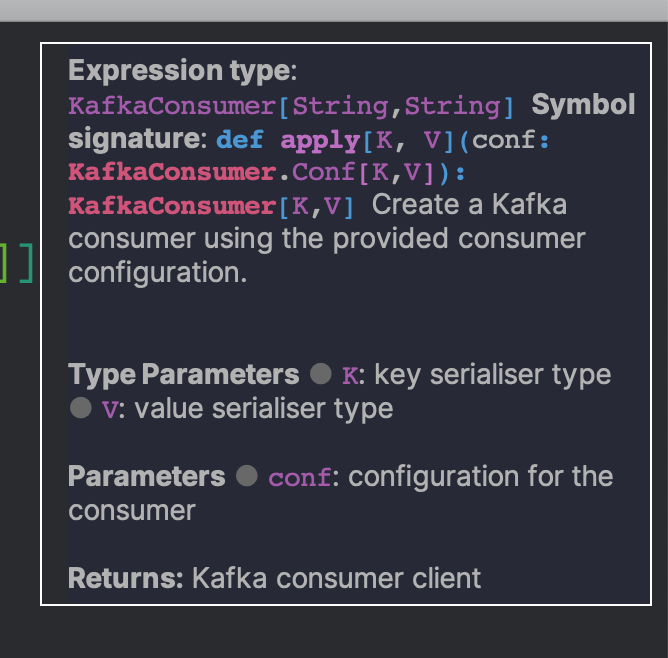 |
| LSP mode in Scala with metals |
If you've gotten this far, I share my most interesting weekly readings in tag here . You can also get these as a weekly newsletter by subscribing here.

09/05/2019 - gtags (GNU global) in emacs for Scala
 |
| Photo by thom masat on Unsplash |
I looked up what solutions were available, and the only option that seemed good enough was using the classic
ctags/etags/gtags I hadn’t used since my C days.Having a tags implementation can bring an almost-decent jump-to-definition essentially for free: gtags (and the others) work by pre-analysing the data and generating symbol maps which are usually stored as files, the overhead in speed and memory is minimal.
Installing it can get somewhat unintuitive (specially on Mac), since you need very specific settings for it to work with emacs and especially, Scala code.
Start by installing GNU global:
brew install global --with-pygments --with-ctags --with-exuberant-ctagspygments.Aside from this you will need to export the following environment variables:
GTAGSCONF=/usr/local/share/gtags/gtags.conf
GTAGSLABEL=pygmentsggtags-mode. If you use spacemacs, you only need to activate the gtags layer.All this has become moot as soon as metals has reached a usable state: now you can have a really fast language server for Scala, written in Scala with low memory overhead.
29/04/2018 - Modifying the agnoster theme for zsh
Even though I have been a long time user of oh-my-zsh on zsh (moved from plain bash to zsh like 10 years ago), I have been very minimal on my use of its theme capabilities. I have used the default theme forever:
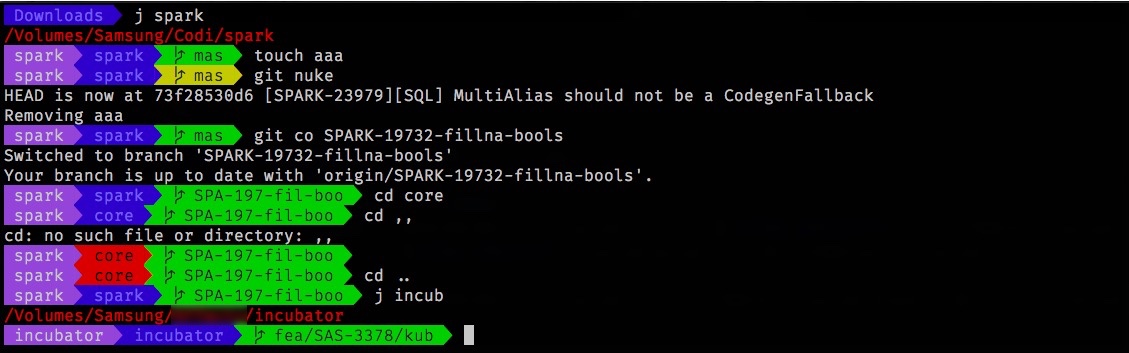


robbyrussell. But recently I was showing my friend @craftycoder the tweaks I have on my system (fzf, autojump, etc) and he showed me this theme, agnoster. It had several pieces I liked:- Powerline-style prompt
- Git status
- Virtualenv detection
What did I want to modify?
- Too long branch names. Looks very nice with
masterbut is a bit more troublesome withfeature/SAS-4028/kubernetes/poc - I don’t care that much about the path. Current directory is enough
- Usually I like knowing in which
gitproject I am in better
Path
I played around with several options to make the path look as I would like. I started with the shrink-path Zsh plugin, but I didn’t totally like how it looked. I cobbled together a bit ofawk to get 2 or 3 characters out of each piece of the path instead, it didn’t look much better but was taking much more space. Ended up with just current dir, this is excellent actually.Branch name
Paths at work are of the form{kind}/{ticket number}/{description}. I don’t want to know all the pieces. Kind is any of feature, hotfix (very rarely) or occasionally might be something else. It could be shortened to just a few letters. In general, I like seeing the full ticket number (no specific reason). I don’t need to know the full description, it can be shortened to 4 or 5 characters. Awk to the rescue. I love awk. With it I reduced the branch names to what I wanted, additionally I wrote a small checker that makes Spark’s style pull request naming also be shortened. You can check the awk approach here.Git project
Knowing the project and current folder is everything I need to know. If I need to know more, I justpwd.Error under last command, root, background processing
I don’t like my prompt to change shape. I changed the error reporting to switch colours of the current directory to red. And dropped background processes and root reporting, since I’m never root on my machine, and never run anything in the background unless it needs to be globally.User information
I’m usually pretty sure which user I am, so... Removed it, I prefer a shorter prompt if possible.Some helpers
I added a couple of helpers, reusing some of the code/ideas: jump to Github and jump to JIRA. You can see them in the repository.
11/09/2016 - More emacs configuration tweaks (multiple-cursor on click, minimap, code folding, ensime eval overlays)
At Affectv we use a wide range of editors: Sublime, Atom, Emacs, Pycharm, IntelliJ... Actually only two people use the same editor! As such, from time to time I see things in other people's editors that I would like to have as well. So, yesterday I decided to improve on some configuration settings on Spacemacs.
Click for multiple-cursors
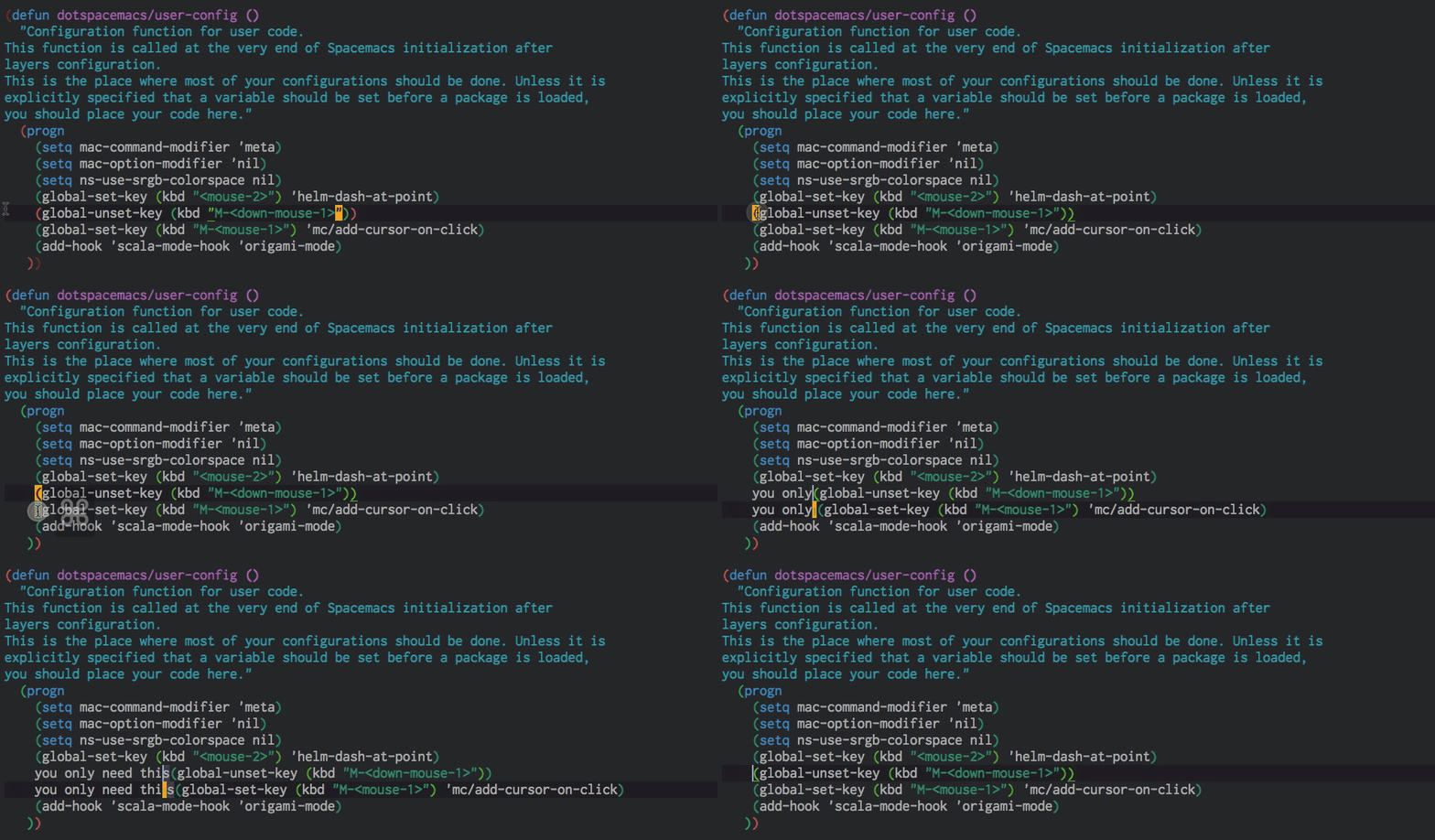
I saw this on Jordi's Sublime, and it is much more comfortable than using more-like-this or similar helper functions, even if I need to use the trackpad to do so. After all, a multi-cursor edit (proper edit, not as a substitute for a macro) is rare enough that I can tolerate leaving the home row. Easy enough to configure thanks to Magnar Sveen.
(global-unset-key (kbd "M-<down-mouse-1>"))
(global-set-key (kbd "M-<mouse-1>") 'mc/add-cursor-on-click)
Minimap
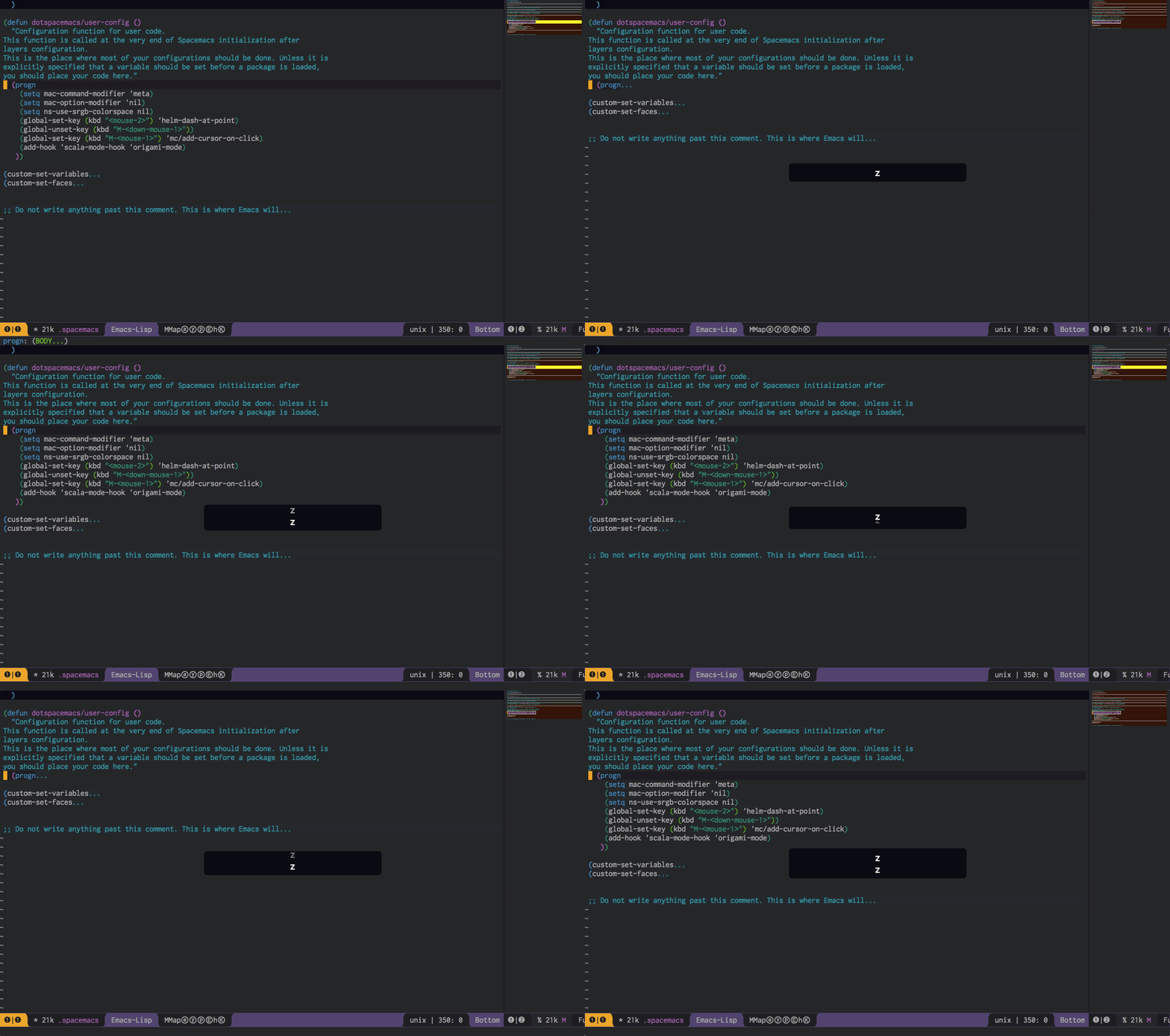
Also from Sublime, I had this on my old emacs setup. As simple as adding minimap to the list of additional packages and configuring its property group. See animation below.
dotspacemacs-additional-packages '(helm-dash key-chord pig-mode mmm-mode minimap origami ansible)
Folding
I have always loved how clean vim's folding works, and how Sublime has this nice folding. Then I found origami-mode and my emacs-life was complete. I tweaked a little the folding functions so that minimap was updated on fold (for some reason it is not, I guess minimap is tied to the "modified" hook or similar). I bound
z and Z (and A-z which maps to æ in Colemak) to the basic fold operations.(eval-after-load 'origami
'(progn
(defun rb-show-only (buffer point)
(interactive (list (current-buffer) (point)))
(progn (origami-show-only-node buffer point)
(minimap-new-minimap)))
(defun rb-toggle-rec (buffer point)
(interactive (list (current-buffer) (point)))
(progn (origami-recursively-toggle-node buffer point)
(minimap-new-minimap)))
(define-key evil-normal-state-map "æ" 'rb-show-only)
(define-key evil-normal-state-map "Z" 'origami-toggle-node)
(define-key evil-visual-state-map "Z" 'origami-toggle-node)
(define-key evil-insert-state-map "C-Z" 'origami-toggle-node)
(define-key evil-normal-state-map "z" 'rb-toggle-rec)
(define-key evil-visual-state-map "z" 'rb-toggle-rec)
(define-key evil-insert-state-map "C-z" 'rb-toggle-rec)
)))
For some reason just advising the functions with after didn't work, this is not great but does work. I left the Z bindings as they are, since I have not used them yet, and will probably delete them if I keep not using them.
Execution overlays in Ensime (Scala)
I saw this for Cider in the emacs church meeting from August, and heard @fommil (I think it was him) mention that it was coming to ensime. And indeed it was. And it's easy enough to use
C-c C-v C-r (thing of it as extended command, eval, region to remember), given an open inferior Scala interpreter. Symbol prettify does not apply to overlays, so you need to customise the arrow used therein.
07/08/2016 - Moving from Emacs to Spacemacs

A couple of days ago I attended (first time I managed in almost 6 months) the London chapter of the Emacs Church (also known as the local meetup for emacs lovers). In this event we were shown how to use emacs effectively for Clojure development (using Cider) and I saw in real life Spacemacs.
In case you don't know, Spacemacs is a "distribution" of Emacs prepared (is open source, of course) to be easy to setup, and somehow specially prepared for former Vim users to move to Emacs. For instance, on startup asks if you want to be in Emacs mode, evil mode or hybrid (Emacs mode keys in vim insert mode) by default.
As you may remember, I've been using Emacs with evil for around 3 years already, and have been pretty happy with it. I'm not so happy about the state of my .emacs file: currently it is 2652 lines long (of course around 400 or 500 of those are generated automatically by custom). Too big and unwieldy. And I'm too lazy to move all the nuts and bolts to something more lightweight and sane.
I thought that trying out Spacemacs could be the perfect excuse to clean the mess off my .emacs file, since I could carefully move piece by piece whatever I needed as I needed it (like I usually do when upgrading computers).
For a start, the beginning was a good experience. Since by default it includes most of the fancy stuff I use normally (helm being the biggest, fanciest helper I need, I only needed to tweak helm-files and switch-buffer, and add recentf) and I no longer use mu4e on a day-to-day basis, I could easily switch to it.
It's actually really easy to try Spacemacs alongside your normal emacs: just download it and from the spacemacs folder run something like
HOME=~/fromsource/spacemacs /Applications/Emacs.app/Contents/MacOS/Emacs
or the equivalent in your environment. Caveat: multi-term/ansi-term won't work as expected (best solution is to actually move to using Spacemacs as default). Aside from that I have had no other big issues, and recently moved to Spacemacs to be the main Emacs and if needed I can run my old configuration with the "HOME trick".
One thing I have not figured out how to exactly do "the Spacemacs way" but I needed no matter what is having my set of normal Emacs keybindings in evil insert and normal modes. Hybrid mode covers insert more or less nicely, but some commands I need them as they are because not only are they part of my muscle memory, but I also happen to like them and use them everywhere (OS X input fields, terminal windows). I tried to set this up in many places in the .spacemacs file (the user-config section, using the -init or -after macros of package initialisation...) And finally this made it work, so, in case you need to modify evil insert or normal key maps in Spacemacs:
(eval-after-load 'evilSomething I found surprising though is the load time: Spacemacs does not load packages on startup and my .emacs setup did, and they roughly start up at the same speed. Somehow I expected a faster startup time.
'(progn
(define-key evil-normal-state-map (kbd "SPC") 'ace-jump-mode)
(define-key evil-insert-state-map (kbd "C-a") 'move-beginning-of-line)
(define-key evil-insert-state-map (kbd "C-e") 'move-end-of-line)
(define-key evil-insert-state-map (kbd "C-k") 'kill-line)
(define-key evil-insert-state-map (kbd "C-w") 'kill-region)
(define-key evil-visual-state-map (kbd "C-a") 'move-beginning-of-line)
(define-key evil-visual-state-map (kbd "C-e") 'move-end-of-line)
(define-key evil-normal-state-map (kbd "C-a") 'move-beginning-of-line)
(define-key evil-normal-state-map (kbd "C-e") 'move-end-of-line)
(define-key evil-normal-state-map (kbd "C-k") 'kill-line)
(define-key evil-normal-state-map (kbd "C-y") 'yank)
(define-key evil-insert-state-map (kbd "C-y") 'yank)
(define-key evil-insert-state-map (kbd "C-t") 'transpose-chars)
(define-key evil-normal-state-map (kbd "C-w") 'kill-region)
(define-key evil-visual-state-map (kbd "C-w") 'kill-region)
(define-key evil-visual-state-map (kbd "SPC") 'ace-jump-mode)))
Worth also downloading the latest emacs port for homebrew, which fixes some annoyances with powerline colours as well as being quite more up to date than Carbon Emacs.
Now the only big thing left I have is reconfiguring multiple-cursors and my definitions of more-like-this and all that to be a happy Spacemacs user.
02/11/2015 - SyncTeX and pdf-view-mode for emacs
Or, destiny is cruelBack in the days of yore, when I was switching between my Windows machine and a Linux machine, I remember having SyncTeX active in my Windows machine. It was a wonderful experience:
SyncTeX lets you click anywhere on a generated file from LaTeX and gets back to your editor, to the place generating where you clicked. This was extremely useful, specially later on when you need to adjust many formulas to fit and you need a bit of back-and-forth-ing.Then I got a Mac, and since
Preview is so handy I slowly forgot about SyncTeX. Time went on, and I merrily kept on editing LaTeX files as usual. I even managed to deliver my PhD dissertation a couple weeks ago, the formal speech will be in a month or two (come at your own risk). AucTeX’s preview saved most of the days, so I slowly even forgot SyncTeX existed. Shame on me indeed.The other day I got an annotated PDF from one of my advisors, and I just couldn’t open the annotations. I tried all programs I had for Mac, and no luck: annotations weren’t showing, just saw the icons. Surveying for some command-line tool to extract annotations (just in case) I found pdf-tools, a replacement for
DocView based on Poppler. It had the awesome ability of actually displaying annotations, with it it was pretty clear the annotations were broken in that PDF. I got a new set of PDFs from my advisor with the annotations in place, though. While waiting for it to arrive…I saw
SyncTeX was an option of pdf-tools. I had been using that, hadn’t I? So, I activated SyncTeX in AucTeX (it is TeX-source-correlate-method, see here) and indeed: I could have two frames, one with the actual LaTeX sources and the other with a PDF, and go from one to the other. Even hyperreferences in PDF work! See (well, click on the full-screen mode to see it larger or you won't see anything)!Getting
pdf-tools to work wasn’t incredibly tricky (given the hoops you need for some packages, sometimes). Just brew install pdf-tools
and after reading
brew info pdf-tools
I was told to run
emacs -Q --batch --eval "(package-install-file \"/usr/local/Cellar/pdf-tools/0.60/pdf-tools-0.60.tar\")"
and this does the trick (well, change emacs for your actual emacs, which likely is
/Applications/Emacs.app/Contents/MacOS/Emacs) You’ll also need to add to your .emacs file (or temporarily in your *scratch* buffer)
(setenv "PKG_CONFIG_PATH" (concat "/usr/local/Cellar/zlib/1.2.8/lib/pkgconfig" ":" "/usr/local/lib/pkgconfig:/opt/X11/lib/pkgconfig"))

(getenv "PKG_CONFIG_PATH")
and run
(pdf-tools-install)
as advised in the package’s README. And that's it, open a PDF and activate pdf-view-mode to check everything is in place. Well worth it!
07/07/2012 - Back to gnus (emacs mail reader)

I've been thinking about getting a new Macbook lately (my heart and wallet were divided among a 11" Air or a 15" Retina Pro). My 4-year old Macbook (Early 2008 I think, 2 GB Ram, Intel Core Duo 2.4 GHz) was showing its age. Mainly when I had the RAM and cache hungry inhabitants of my dock active: Yorufukurou (the best twitter client for managing multiple accounts in a Mac I've seen) and Sparrow (mail client).
Why was I using Sparrow? Back when I started my current job, I was using gnus in emacs, after the quite successful 30 days in emacs challenge I did in the beginning of that year. But for some reason I can't remember I moved from gnus to Thunderbird, which I could use both in my Mac and my netbook (I have the vague feeling that gnus had some problems in my netbook). I kept using Thunderbird for a long while until I found Sparrow. What did I find so appealing about Sparrow? Keyboard shortcuts. Yeah, I want to archive, move and delete mails quickly without moving my mouse. Sparrow had that (Apple Mail and Thunderbird do not.) What baffles me is why I didn't try gnus again. Anyway.
I was so happy, pressing keys and moving emails around. But my Mac was increasingly sluggish: if I had Chrome with more than a handful of tabs, Sparrow and Yorufukurou I could get the spinning beachball of death after doing anything. So you can imagine what PITA was starting MAMP or running a Django test server (for my What Language Is project, among others). The purge command only helped a little, closing Chrome, Adium and others did almost nothing. Rebooting helped some more, but wasn't a decent solution. What was the problem?
Paging. And caching. In the last months I've been living with around 3-4 GB of free space. It should be plenty for system paging in the disk cache. The problem is that it was not plenty for Sparrow's mail cache. I found this out when, after a reboot my hard disk showed almost 3 more free GB. It could not be Chrome's cache, since I had cleared it very recently. It could not be my Mac's cache, since last time I checked before rebooting I had less than 1 GB paged and had some (little) free memory still. I opened Sparrow and then checked its caches in the Library folder. amounted to more than 1.5 GB, just after booting. Damn.
Just by coincidence around this time I read a post by Sacha Chua, talking with John Wiegley (emacs lisp developer) and thought: maybe it's time to give gnus another try. I thought I'd need some heavy configuration tweaking or whatever before getting to grips with it. I thought I had a reason for giving up gnus. Just in case aliases or multiple accounts were a problem before, I disabled gmail and only left my work account (I'd use gmail in the web interface for personal emails) before starting gnus again. My password was wrong, I changed it. I set up multiple mail aliases for my work account: tweaked the borrowed function I was using to select an SMTP account to switch to my main account in case of unknown account (since I have more than 20 aliases over it and configuring all them was overkill.)
Used gnus again for a while. My Mac was floating around without paging. The fan didn't spin. No hard drive sounds. Quick keyboard shortcuts I almost know by heart by now. Gnus, here I am again.

05/06/2011 - Using an Apple Remote with Mac OS Preview

Last Tuesday I presented a talk in a congress, here in Barcelona. This post is not about this talk, but about the Mac remote and Apple's "problems". If you are interested, you can download the talk here, anyway.
As the congress was local, instead of using my netbook for the talk I brought my MacBook. Instead of using arrow keys, I could use these fancy Apple remotes. Good plan... at the moment. I asked a colleague for his Apple remote (my girlfriend had hers in her office, and I could not get it soon enough)... And after lunch, before my talk I checked if it worked.
Well, as you already know, I use LaTeX and Beamer to create my presentations... And generate as output a PDF file. Which I then open with Preview, a native Mac OS app. And when I tried to use Apple Remote, it didn't pass the pages. Why? Well, Apple only supports a handful of applications, the most relevant being Keynote and Front Row. And not Preview. I was shocked.
As I expected, there was a free solution to this problem, but at first it looked troublesome. I found a program named iRedLite. The "Lite" part scared me: would I be only able to pass 30 pages and then need to enter my registration?
Turns out it is "Lite" because there is a Pro version which can interact with a USB infra-red emitter to control your TV and other gadgets. It works wonderful, no problems. If you ever need to give a PDF presentation with a Mac, give it a try.
I had another solution which hopefully I didn't have to use: a free application for iPhone, RemotePad and RemotePad server in my Mac (there is also a Linux version). But passing pages is a little cumbersome, needing to flip+scroll in a very small screen. Far better to use the remote with iRedLite!
As the congress was local, instead of using my netbook for the talk I brought my MacBook. Instead of using arrow keys, I could use these fancy Apple remotes. Good plan... at the moment. I asked a colleague for his Apple remote (my girlfriend had hers in her office, and I could not get it soon enough)... And after lunch, before my talk I checked if it worked.
Well, as you already know, I use LaTeX and Beamer to create my presentations... And generate as output a PDF file. Which I then open with Preview, a native Mac OS app. And when I tried to use Apple Remote, it didn't pass the pages. Why? Well, Apple only supports a handful of applications, the most relevant being Keynote and Front Row. And not Preview. I was shocked.
As I expected, there was a free solution to this problem, but at first it looked troublesome. I found a program named iRedLite. The "Lite" part scared me: would I be only able to pass 30 pages and then need to enter my registration?
Turns out it is "Lite" because there is a Pro version which can interact with a USB infra-red emitter to control your TV and other gadgets. It works wonderful, no problems. If you ever need to give a PDF presentation with a Mac, give it a try.
I had another solution which hopefully I didn't have to use: a free application for iPhone, RemotePad and RemotePad server in my Mac (there is also a Linux version). But passing pages is a little cumbersome, needing to flip+scroll in a very small screen. Far better to use the remote with iRedLite!

30/12/2010 - Emacs 30 Day Challenge: Get the latest gnus to improve speed

Ever since my first post of the emacs 30 Day Challenge, I was warned about gnus slowness. A lot of comments in reddit pointed to this, and suggested using wanderlust or installing a local IMAP server (like dovecot or notmuch) to speed up the IMAP back-end (search, retrieval and processing), while also allowing for offline reading.
The main drawback was keeping it nicely cross-platform. As you may remember, I split my time between two computers: my MacBook and my Acer netbook. Any solution regarding to gnus had to be completely cross-platform in the most seamless way I could. And having a local IMAP server didn't look like it (although notmuch can be installed through macports).
When I posted my first update on gnus in HackerNews, a kind reader pointed me to the latest development snapshot, as having far, far better IMAP and nnir (the gnus IMAP search system) support. I went to the gnus homepage, and downloaded the latest CVS snapshot. It didn't work any better, it was in fact worse: nnir search didn't even work!
The problem? The latest development snapshot is in git, not in CVS! By the way, I have found very hard to know which is the latest version of gnus. I had Gnus 5.13 (if I'm not mistaken) before installing the git version, which is NoGnus 0.11 All gnus alpha versions are labeled NoGnus, to distinguish them from the final versions.
What do you need to install the latest gnus? First, a recent copy of git. At least 1.7.0.4 as suggested by the gnus git page. Don't ignore this: I had an outdated git in my MacBook and without upgrading it I could not get the package.
Once you have a current git system, fire a terminal window and go to where you want to have your new gnus. I did the following steps in ~/emacs/ Download the repository with
The main drawback was keeping it nicely cross-platform. As you may remember, I split my time between two computers: my MacBook
and my Acer netbook. Any solution regarding to gnus had to be completely cross-platform in the most seamless way I could. And having a local IMAP server didn't look like it (although notmuch can be installed through macports).When I posted my first update on gnus in HackerNews, a kind reader pointed me to the latest development snapshot, as having far, far better IMAP and nnir (the gnus IMAP search system) support. I went to the gnus homepage, and downloaded the latest CVS snapshot. It didn't work any better, it was in fact worse: nnir search didn't even work!
The problem? The latest development snapshot is in git, not in CVS! By the way, I have found very hard to know which is the latest version of gnus. I had Gnus 5.13 (if I'm not mistaken) before installing the git version, which is NoGnus 0.11 All gnus alpha versions are labeled NoGnus, to distinguish them from the final versions.
What do you need to install the latest gnus? First, a recent copy of git. At least 1.7.0.4 as suggested by the gnus git page. Don't ignore this: I had an outdated git in my MacBook and without upgrading it I could not get the package.
Once you have a current git system, fire a terminal window and go to where you want to have your new gnus. I did the following steps in ~/emacs/ Download the repository with
git clone http://git.gnus.org/gnus.gitand then you are ready to go with
cd gnusNow make would finish the charm and get you a ready to use gnus... But sadly, it didn't work in my MacBook (had no problems in the netbook)! The problem?
./configure
Cannot open doc string file "/Applications/Emacs.app/Contents/Resources/etc/DOC-22.1.1"I did a ugly hack to solve this,
make[1]: *** [gnus-load.el] Error 255
make: *** [lick] Error 2
cd /Applications/Emacs.app/Contents/Resources/etcYMMV here when copying the correct DOC-emacs-ver file. Just check which one do you have. Then I changed where my emacs looked for gnus by adding
cp DOC-22.3.1 DOC-22.1.1
cd -
make
(add-to-list 'load-path "~/emacs/test-git-gnus/gnus/lisp/")to my .emacs file. When I checked with M-x gnus, it was blindingly fast. Starts up in a whim, and updates in a moment. But when I tried G G to do a mail search I got
(require 'gnus-load)
nnir search Symbol's value as variable is void: gnus-registry-installD'uh! What's this? I still don't know... But after a small google search I found a viable solution:
(setq gnus-registry-install t)Now you can check that G G searches amazingly fast through your Gmail inbox.
(setq nnmail-crosspost t)On the other hand, to prevent mails you processed through Gmail's website (or another mail reader) to be again in your gnus inbox (and then being unable to delete them or mark them as read as the server responds with a "non existent post"), add this to your .gnus.el:
(setq gnus-agent nil)
I hope you enjoyed this second installment in the world of gnus. I hope you give gnus another try, if the problem you had was its speed. The development git gnus will surprise you!
If you enjoyed this post, please share it with your emacs (or emacs-wannabe) friends through Hacker News, Reddit/emacs, Twitter or even Facebook. Thank you for reading this far!
The "Related posts" method I use involves Javascript, thus it doesn't work in the RSS feed. To view related posts, please refer to the original article. Thanks!
21/12/2010 - The emacs 30 Day Challenge: A glimpse of BBDB, The Insidious Big Brother Database and gnus
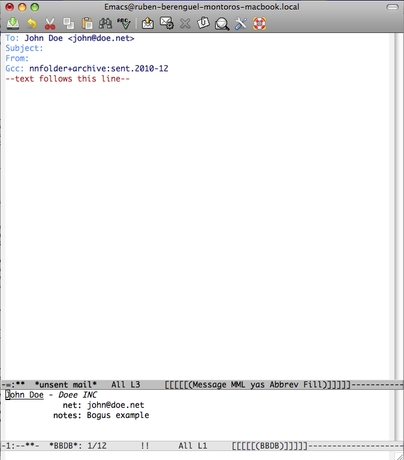
Bbdb stands for The Insidious Big Brother Database, and is a very powerful contact book for emacs. It holds names, emails, aliases and other information and has good integration with gnus, wanderlust and vm (view mail). In my case, I have only checked gnus integration which is indeed pretty good.
This is the third installment in the set of posts for the emacs 30 Day Challenge: doing everything (as far as possible) from within emacs.
First you'll need o get the package from SourceForge here. Uncompress in something like ~/emacs/bbdb. The following lines can be add either to your usual .emacs file (if you want to use it 'always') or to your .gnus.el if you will use bbdb only when you use gnus. You can activate it with
This is the third installment in the set of posts for the emacs 30 Day Challenge: doing everything (as far as possible) from within emacs.
First you'll need o get the package from SourceForge here. Uncompress in something like ~/emacs/bbdb. The following lines can be add either to your usual .emacs file (if you want to use it 'always') or to your .gnus.el if you will use bbdb only when you use gnus. You can activate it with
(add-to-list 'load-pathAnd activate gnus integration with
"~/emacs/bbdb/lisp")
(require 'bbdb)
(bbdb-initialize 'gnus 'message)
(bbdb-insinuate-message)
(add-hook 'gnus-startup-hook 'bbdb-insinuate-gnus)
You are ready to start filling your database! The first step I took here was moving my bbdb file (the main contact database) to Dropbox with
(setq bbdb-file "~/Dropbox/bbdb")
This means that my database keeps automagically in sync from my netbook and my MacBook
 . Now that everything looks fine, let's check gnus integration. M-x gnus, open some email from your inbox and press : (colon). Voilà! You should have a newly created buffer with an automatic bbdb entry for the mail sender. You can edit the newly created record with e or add a new field with C-o. Also, delete the current field with d, and the current record if you are in the first field. For more information, press C-h m.
and my MacBook. Now that everything looks fine, let's check gnus integration. M-x gnus, open some email from your inbox and press : (colon). Voilà! You should have a newly created buffer with an automatic bbdb entry for the mail sender. You can edit the newly created record with e or add a new field with C-o. Also, delete the current field with d, and the current record if you are in the first field. For more information, press C-h m.Once you have something in your database, you can search through it with M-x bbdb (or via anything.el integration, but this package is a topic for another post), and send an email to a contact by getting the cursor over their record and pressing m. This uses the default emacs mail sender, and you probably prefer to send this mail via gnus (I do, to take advantage of multiple SMTP accounts). To use it add the following to your .gnus.el:
(setq bbdb-send-mail-style 'gnus)
But most times, I start writing an email and then decide to whom I want to send it. And bbdb together with gnus has a good method of doing this. You only need to type the first few characters of the name (forename or surname) or the first few characters of the (primary) net address and press tab to fill to the first result, and keep pressing tab to cycle to all possible completions. To get this, add the following
(setq bbdb-complete-name-full-completion 't)Finally, some other configuration stuff I find useful
(setq bbdb-completion-type 'primary-or-name)
(setq bbdb-complete-name-allow-cycling 't)
(setq
bbdb-offer-save 1
bbdb-use-pop-up t
bbdb-electric-p t
bbdb-popup-target-lines  1
)
where 1 means save without asking (one yes-and-no question you can skip, usually), and the other options make the default bbdb 'record found' screen very small and disposable by pressing space (i.e. electric).
You may find answer to some bbdb questions in the emacswiki.
If you liked this, please share it with your emacs friends through Reddit, Hackernews or whatever you enjoy.
The "Related posts" method I use involves Javascript, thus it doesn't work in the RSS feed. To view related posts, please refer to the original article. Thanks!
11/12/2010 - The emacs 30 Day Challenge: Using 'gnus' to read mail
When the time to choose a mail reader for emacs came, as part of my emacs 30 Day Challenge, there were not really a lot of options. A long, long time ago I had tried vm (view mail) with no luck. I don't remember the details (it was something like 3 years ago), but the results where unappealing. The only contenders where gnus and wanderlust.
I managed to configure gnus pretty quickly: in only 30 minutes I had my gmail inbox working and was able to send mails through my main account.
I decided to give wanderlust a try, after reading a good review and configuration steps from emacs-fu. But had no luck (at least in my netbook), some kind of connectivity problem, probably due to some package which was not the correct version: wanderlust is very picky with what version of what package you have installed. I gave up and stood with gnus.
I use gmail, together with several accounts from mostlymaths.net, and have configured my main account in gmail to be able to send mails through all my other accounts. Let's configure this. The following configuration is taken from the emacswiki with a few other tweaks from here and there. First C-x C-f ~/.gnus.el, and add the following lines, filling in your details
I managed to configure gnus pretty quickly: in only 30 minutes I had my gmail inbox working and was able to send mails through my main account.
I decided to give wanderlust a try, after reading a good review and configuration steps from emacs-fu. But had no luck (at least in my netbook), some kind of connectivity problem, probably due to some package which was not the correct version: wanderlust is very picky with what version of what package you have installed. I gave up and stood with gnus.
Installing and configuring gnus with gmail and multiple smtp accounts
If you have a recent emacs version, you'll have already gnus installed and you can start it with M-x gnus. But it is far better to configure it first. And it is far better to start by installing gnutls or starttls, depending on your system. You can do this with your package manager in Linux, or using fink or macports in Mac OS. This allows you to use SSL to connect to your mail servers. This is also a required step to use twittering.el (to be covered in a few days) and I guess it is also required (or should be required!) by jabber.elI use gmail, together with several accounts from mostlymaths.net, and have configured my main account in gmail to be able to send mails through all my other accounts. Let's configure this. The following configuration is taken from the emacswiki with a few other tweaks from here and there. First C-x C-f ~/.gnus.el, and add the following lines, filling in your details
;; You need this to be able to list all labels in gmail

(setq gnus-ignored-newsgroups "")

;; And this to configure gmail imap

(setq gnus-select-method '(nnimap "gmail"
(nnimap-address "imap.gmail.com")
(nnimap-server-port 993)
(nnimap-stream ssl)))

;; My version of gnus in my Mac does not handle html messages
;; correctly (the one in the netbook does, I guess it is a different
;; version). The following will chose plaintext every time this is
;; possible.

(setq mm-discouraged-alternatives '("text/html" "text/richtext"))

;; Available SMTP accounts. The format is
;; type of connection - account in the from field - smtp server -
;; port - login name - password. You can leave the password field
;; as NIL and emacs will ask every time

(defvar smtp-accounts
'(
(ssl "mainaccount@gmail.com" "smtp.gmail.com"
587 "mainaccount@gmail.com" "yourpassword")
(ssl "mainaccount@mygoogleapps" "smtp.gmail.com"
587 "mainaccount@mygoogleapps" "otherpassword")
(ssl "workaccount@university" "smtp.gmail.com"
587 "mainaccount@gmail.com" "yourpassword") ))

;; Now lets configure smtpmail.el with your name and functions to send
;; mail using your smtp accounts by changing the from field

(require 'smtpmail)
(setq send-mail-function 'smtpmail-send-it
message-send-mail-function 'smtpmail-send-it
mail-from-style nil user-full-name "Your name"
smtpmail-debug-info t smtpmail-debug-verb t)

(defun set-smtp (mech server port user password)
"Set related SMTP variables for supplied parameters."
(setq smtpmail-smtp-server server smtpmail-smtp-service port
smtpmail-auth-credentials (list (list server port user
password)) smtpmail-auth-supported (list mech)
smtpmail-starttls-credentials nil)
(message "Setting SMTP server to `%s:%s' for user `%s'."
server port user))

(defun set-smtp-ssl (server port user password &optional key
                cert)
"Set related SMTP and SSL variables for supplied parameters."
(setq starttls-use-gnutls t
starttls-gnutls-program "gnutls-cli"
starttls-extra-arguments nil smtpmail-smtp-server server
smtpmail-smtp-service port
smtpmail-auth-credentials (list (list server port user
password)) smtpmail-starttls-credentials (list (list
server port key cert)))
(message
"Setting SMTP server to `%s:%s' for user `%s'. (SSL
enabled.)" server port user))

(defun change-smtp ()
"Change the SMTP server according to the current from line."
(save-excursion
(loop with from = (save-restriction
            (message-narrow-to-headers)
            (message-fetch-field "from"))
for (auth-mech address . auth-spec) in smtp-accounts
when (string-match address from) do (cond
   ((memq auth-mech '(cram-md5 plain login))
    (return (apply 'set-smtp (cons auth-mech auth-spec))))
   ((eql auth-mech 'ssl)
    (return (apply 'set-smtp-ssl auth-spec)))
   (t (error "Unrecognized SMTP auth. mechanism:
`%s'." auth-mech))) finally (error "Cannot infer SMTP
information."))))

;; The previous function will complain if you fill the from field with
;; an account not present in smtp-accounts.

(defvar %smtpmail-via-smtp (symbol-function 'smtpmail-via-smtp))

(defun smtpmail-via-smtp (recipient smtpmail-text-buffer)
(with-current-buffer smtpmail-text-buffer
(change-smtp))
(funcall (symbol-value '%smtpmail-via-smtp) recipient
smtpmail-text-buffer))

;; This wraps send mail via smtp mail, to be able to send multiple
;; messages with smtpmail.
Now, we can configure the authentication process. Open ~/.authinfo and fill it with the following data
machine imap.gmail.com login john_doe@gmail.com password notapassword port 993
If you don't like to store your passwords in plain text, you can either leave it blank (gnus will ask every time for your password) or use an encrypted authinfo file. I could not use this solution, as the emacs I have in my Mac has no encryption. But you can check it if you do!
Ready to use gnus! M-x gnus. After a few seconds of data processing, you should have a buffer named *Groups*. In gnus, you subscribe to groups, and the available groups should be your gmail labels. To subscribe to something, issue U followed by a double tab. This will show all the available labels. INBOX is the one you should not miss, of course.
Ready to use gnus! M-x gnus. After a few seconds of data processing, you should have a buffer named *Groups*. In gnus, you subscribe to groups, and the available groups should be your gmail labels. To subscribe to something, issue U followed by a double tab. This will show all the available labels. INBOX is the one you should not miss, of course.
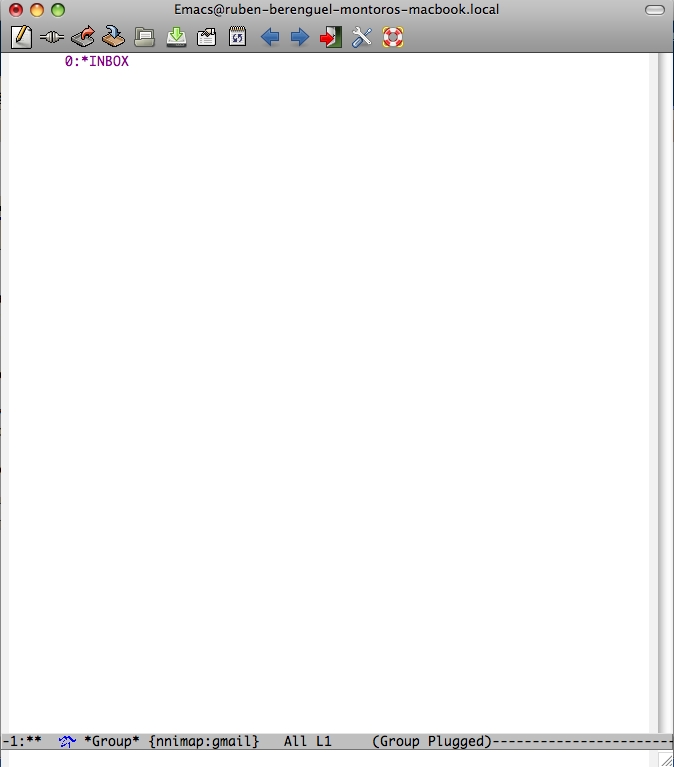
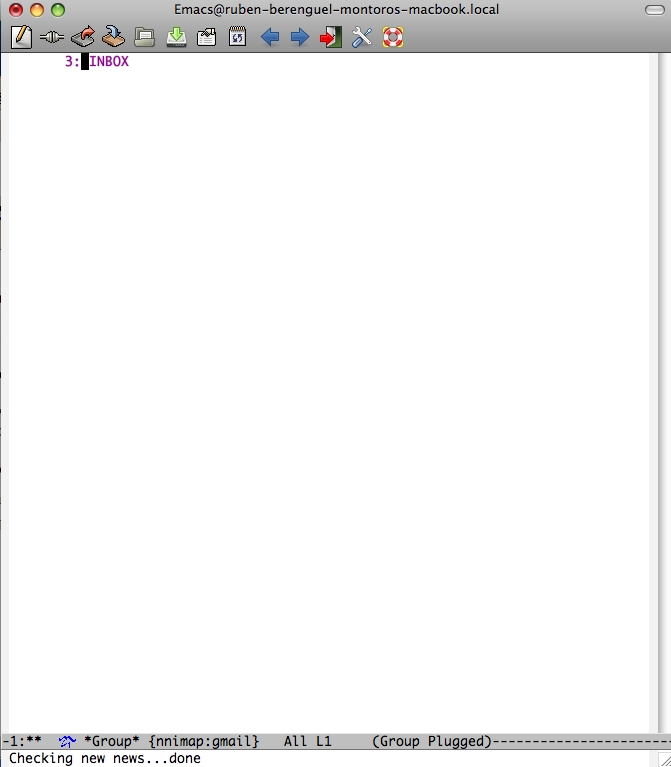
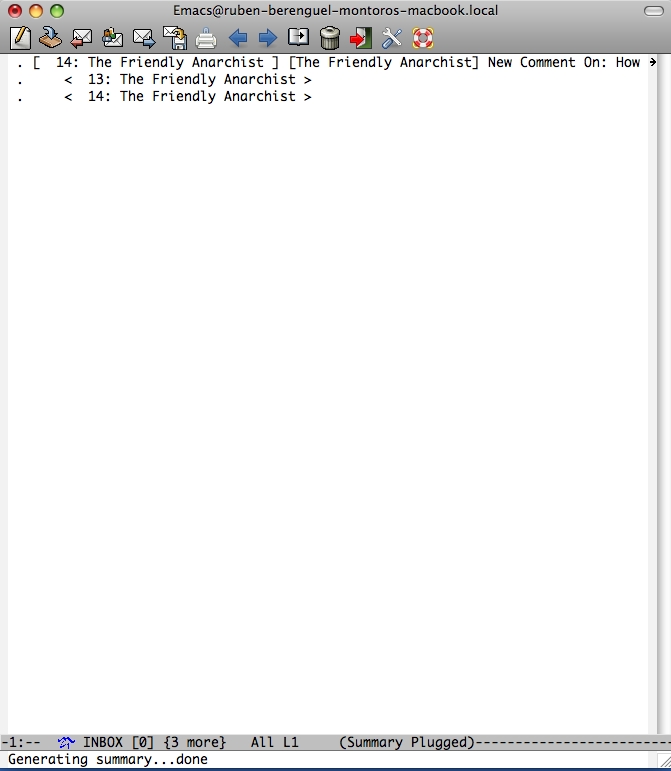
Once you have INBOX in your *Groups* buffer, you may need to update it for new mails. Pressing g will fetch new mails (or news) from the server. Pressing enter will open that group and show you your unread mails. If they don't appear in the INBOX buffer, it is somehow usual. If you had already checked and read your mail, fetch again in the *Groups* buffer and press enter, it takes you to the old INBOX buffer, without the new mails. Press M-g in it to fetch new headers and summaries. Pressing enter in your mails of course opens them.
To quit gnus, in the groups buffer press q (or Q if you don't want to save "your progress"). In case of being lost... Please, use the menus: gnus has a menu for almost anything and they are quite descriptive. And more important, never leave gnus without properly q or Quitting. Also, in my netbook I can't suspend to RAM and then be able to re-start gnus. I have to q first. But in my Mac it works correctly.
We are almost done covering the simplest way to use gnus. Of couse, we want to be able to write emails, or reply to mails we got! In the INBOX buffer, that would be r while reading or selecting a mail. To compose an email out in the cold, you can either use m in INBOX or *Groups* buffers. If you are in any buffer, you can compose an email with C-x m.
And if you use bbdb (the big brother database, a contact manager with automatic fetching of gnus data), which I will cover in the next writing, you can compose an email after searching for someone (M-x bbdb query and then m in the resulting search results buffer).
Deleting mails, composing and replying
Now let's say you want to move a message to the Trash folder in your Gmail account, or your Spam folder. Scroll to your mail and press B m (Backend command + move). Now you can choose which folder, and if everything worked smoothly, you could press double tab and show all folders. If not, write [Gmail]/Trash. This is the correct gmail trash folder. Once you are done with operating with your mails in this way, press M-g to really do move them to the trash (and by the way, marking them in Gmail as read).To quit gnus, in the groups buffer press q (or Q if you don't want to save "your progress"). In case of being lost... Please, use the menus: gnus has a menu for almost anything and they are quite descriptive. And more important, never leave gnus without properly q or Quitting. Also, in my netbook I can't suspend to RAM and then be able to re-start gnus. I have to q first. But in my Mac it works correctly.
We are almost done covering the simplest way to use gnus. Of couse, we want to be able to write emails, or reply to mails we got! In the INBOX buffer, that would be r while reading or selecting a mail. To compose an email out in the cold, you can either use m in INBOX or *Groups* buffers. If you are in any buffer, you can compose an email with C-x m.
And if you use bbdb (the big brother database, a contact manager with automatic fetching of gnus data), which I will cover in the next writing, you can compose an email after searching for someone (M-x bbdb query and then m in the resulting search results buffer).
Searching your mail through imap
And another interesting thing would be to be able to search within your mail. To do so you will need the nnir package and add a line in the imap configuration.;; To be able to search within your gmail/imap mail
(require 'nnir)
(setq gnus-select-method '(nnimap "gmail"
(nnimap-address "imap.gmail.com")
(nnimap-server-port 993)
(nnimap-stream ssl))
(nnir-search-engine imap))
You should subscribe to [Gmail]/All mail, and then press G G to search within your mail. This is a little slow... But works.
I'm still fiddling with gnus, and learning to use it more effectively, but this can get you going with using it for reading your mail. If I learn something new along the way (or someone more used to gnus posts it here) I'll add it here or in a new gnus post.
If you enjoyed this, please share it with your emacs friends through Reddit, Hackernews or whatever you enjoy.
The "Related posts" method I use involves Javascript, thus it doesn't work in the RSS feed. To view related posts, please refer to the original article. Thanks!
14/02/2010 - All hail... Steve Jobs and his iPad?
Made with Sketchbook Mobile...in an iPod TouchAll hail hypnotoad... in real lifeI want to start by saying that I might buy an iPad, and definitely like it, in an abstract setting. But I think that Steve Jobs is kind of blind through his own charisma. He likes the iPad... then it should be liked (and bought) by everyone.I don't think the iPad is gona be a hit. It would, if it was priced 200$ below
19/11/2009 - Retro on iPod Touch (1): Mini vMac
A few days ago I jailbroke my iPod touch. Just for the geek factor, first, as I thought I could get a C compiler on it. I can't yet, so I just have it jailbreaken for a few applications. I'll start my review for a long time loved application in Linux and Mac: Mini vMac.Mini vMac is a hardware emulator, which emulates a whole Mac Plus from the eighties. You just need a real Mac ROM, from a Mac you
19/10/2009 - Why I bought an iPod touch
Mathematician, Linux user, already had an iPod (iPod nano), recently bought a netbook. Why did I buy an iPod touch?Papers for iPhone (7.99€): a organizer for research PDF's with integrated PDF reader (allegedly optimized for research articles), with the ability to sync with the desktop app (29€, less with the 40% discount for students... still waiting for it to buy it). Well, it lives up the
29/09/2009 - Scribus+Latex in Mac OS
or the trouble with hard-coded paths and ineffective menus.
Cross platform page-layout software:
Scribus. Now with more LaTeX
I am supposed to present a poster in a conference, about some work I am doing. I asked office mates about what they used... A Mac user suggested Pages, and I asked a more Linux oriented, LaTeX savvy, and he told me: forget about LaTeX and use some WYSIWYG program,
17/09/2009 - AucTeX again
For a while I have been either not LaTeXing a lot, or not using AucTeX frequently. Strange indeed! But in July, while in Göttingen I wrote part of some lecture notes of one of the courses. And again, used auctex-preview in emacs to find errors in what I was writing.I can't even tell how wonderful it is, to share the source with the images with the formulas. An image is worth more than a googol


