

Nombre de resultats 4
per a Music
23/12/2010 - Give Yourself to Music

It's Friday afternoon after a long day and a long week. You board your train and are lucky to find a seat, soon it is crowded with people standing and chatting. You feel tired after the day, and think just about taking a late afternoon nap upon coming home.
But you plug your earphones , turn up the volume just until you can't hear the train sounds and you are in another place. Together with Bill Evans and his trio in Paris, you delight at his glimmering notes, like fireworks in a pitch dark night. You follow the rhythms of Eddie Gomez (the bassist) and Marty Morell (the drummer) for the journey while Bill's piano keeps on gleaming in the night. Your body is inside a noisy train, but your mind is just anywhere else, just you and your music.
You can hear the soft mumbles of Glenn Gould while he plays the Goldberg Variations, or the fans reach the heavens at the end of Knockin' on Heaven's Door by Guns N' Roses. You stand in the middle of the Sydney Orchestra while KISS' Paul Stanley tells you he knows a thing or two about her.
Music can take us to other places, and drive our mood just through the roof or straight down to the basement. We just need to tune in into the song and we will be there, choose wisely. Be it upbeat or downbeat, if you commit to really listening, be prepared to the change in your mood.
I started very recently to take guitar lessons and learned a very important thing. Although I don't realise it the day I skip my practise, the day I practise I feel very different after doing my chords and arpeggios. I can spend very easily an hour without being aware of the time, practising first, playing freely a little, or trying to make up the notes of some melody that caught my attention recently. Of course, this can only get better with time, as the mechanics of playing get ingrained in my muscles and my hands just creates the sounds my mind thinks of.
Think about listening carefully as a form of meditation, probably best suited for today's work life, when the only free time we may have is our commute, between work and preparing supper. Our mind, just like our legs after a 10km run needs a cool down after a work day. If you fail to give it, you'll feel the mental equivalent of sore legs: mental fatigue. Take a deep breath, plug your earphones and disconnect.
Take also advantage of the effect music has on your mood. Just like 'music tames the wild beast', it can change how you feel: for the good or for the bad. Choose wisely, depending on what you intend to do.
When you are feeling down or tired, get yourself some moody music, close your eyes and let it flow through you. Let the sounds make you soar and start feeling good again. And when you are feeling terrific, put also some more upbeat music: you will get conditioned to feel terrific with it. And when you feel like it, listen anything: music is meant to be played and heard.
If you liked the subject of this post, you may enjoy Effortless Mastery: Liberating the master musician within, by Kenny Werner.
But you plug your earphones
, turn up the volume just until you can't hear the train sounds and you are in another place. Together with Bill Evans and his trio in Paris, you delight at his glimmering notes, like fireworks in a pitch dark night. You follow the rhythms of Eddie Gomez (the bassist) and Marty Morell (the drummer) for the journey while Bill's piano keeps on gleaming in the night. Your body is inside a noisy train, but your mind is just anywhere else, just you and your music.You can hear the soft mumbles of Glenn Gould while he plays the Goldberg Variations, or the fans reach the heavens at the end of Knockin' on Heaven's Door by Guns N' Roses. You stand in the middle of the Sydney Orchestra while KISS' Paul Stanley tells you he knows a thing or two about her.
Music can take us to other places, and drive our mood just through the roof or straight down to the basement. We just need to tune in into the song and we will be there, choose wisely. Be it upbeat or downbeat, if you commit to really listening, be prepared to the change in your mood.
I started very recently to take guitar lessons and learned a very important thing. Although I don't realise it the day I skip my practise, the day I practise I feel very different after doing my chords and arpeggios. I can spend very easily an hour without being aware of the time, practising first, playing freely a little, or trying to make up the notes of some melody that caught my attention recently. Of course, this can only get better with time, as the mechanics of playing get ingrained in my muscles and my hands just creates the sounds my mind thinks of.
Think about listening carefully as a form of meditation, probably best suited for today's work life, when the only free time we may have is our commute, between work and preparing supper. Our mind, just like our legs after a 10km run needs a cool down after a work day. If you fail to give it, you'll feel the mental equivalent of sore legs: mental fatigue. Take a deep breath, plug your earphones and disconnect.
Take also advantage of the effect music has on your mood. Just like 'music tames the wild beast', it can change how you feel: for the good or for the bad. Choose wisely, depending on what you intend to do.
When you are feeling down or tired, get yourself some moody music, close your eyes and let it flow through you. Let the sounds make you soar and start feeling good again. And when you are feeling terrific, put also some more upbeat music: you will get conditioned to feel terrific with it. And when you feel like it, listen anything: music is meant to be played and heard.
If you liked the subject of this post, you may enjoy Effortless Mastery: Liberating the master musician within, by Kenny Werner.
If you liked this post, please share it with your friends through HackerNews, Reddit, Twitter or whatever sharing method you like. Thanks!
Related posts:

The "Related posts" method I use involves Javascript, thus it doesn't work in the RSS feed. To view related posts, please refer to the original article. Thanks!
07/12/2010 - Emacs 30 Day Challenge Update #1: Writing this in Conkeror
It's been already a week since I started my emacs 30 day challenge, and it is time for an update on how it is going and what packages I am using. I'll start giving configuration updates along the way, I'm still fiddling with them.
Browsing with Conkeror
The same day I started my 30 day challenge, the emacs focused blog emacs-fu posted a wonderful article highlighting the conkeror web browser (not to be confused with Konqueror, the standard browser in KDE based desktops).
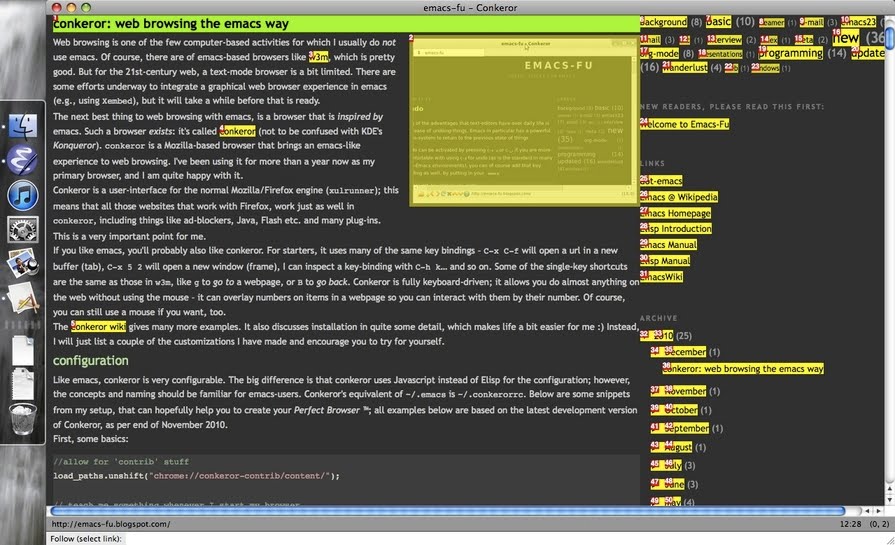
Conkeror is a web browser back-end over the Mozilla xul-runner engine, inspired by emacs. What does this mean? First, that it can be completely (or almost, as I have seen so far) used just with the keyboard, with (almost) standard emacs keybindings.
For example, C-x C-f opens an url in a new browser tab, C-x b switches tabs and C-x k closes a tab. Lowercase f follows links, which appear numbered as you can see in the screenshot below. Of course, C-g cancels the current command. An interesting thing, is that c copies any URL (works as f), but you can copy the current URL by asking it to copy the url numbered 0 (zero).
Conkeror is a web browser back-end over the Mozilla xul-runner engine, inspired by emacs. What does this mean? First, that it can be completely (or almost, as I have seen so far) used just with the keyboard, with (almost) standard emacs keybindings.
For example, C-x C-f opens an url in a new browser tab, C-x b switches tabs and C-x k closes a tab. Lowercase f follows links, which appear numbered as you can see in the screenshot below. Of course, C-g cancels the current command. An interesting thing, is that c copies any URL (works as f), but you can copy the current URL by asking it to copy the url numbered 0 (zero).
Well, first problem is that w3m is (mostly) text-based. Conkeror is a full fledged Mozilla based browser: anything that works in Firefox will work in Conkeror. In particular, Flash or Java based pages. Meaning I can use Google Analytics in Conkeror.
The other problem, is that the first time I wanted to search in Google in w3m, it wasn't able to acknowledge Google's reply, meaning I could not even search! Then I installed Conkeror in my netbook (Arch Linux) and started playing with it. Felt in love almost instantly.
I am writing this in Conkeror, in my Mac OS. In principle, I was not going to get fully involved in the emacsification of my Mac computer, but yesterday I made up my mind. More on this later.
In my Arch Linux installation, it looked like the mouse did nothing, but so far I have found a few uses in the Mac: interacting with Flash and with the (non-Flash) blogger editor.
The other problem, is that the first time I wanted to search in Google in w3m, it wasn't able to acknowledge Google's reply, meaning I could not even search! Then I installed Conkeror in my netbook (Arch Linux) and started playing with it. Felt in love almost instantly.
I am writing this in Conkeror, in my Mac OS. In principle, I was not going to get fully involved in the emacsification of my Mac computer, but yesterday I made up my mind. More on this later.
In my Arch Linux installation, it looked like the mouse did nothing, but so far I have found a few uses in the Mac: interacting with Flash and with the (non-Flash) blogger editor.
Reading mail with gnus. Gave wanderlust a try, didn't work
I'm reading mail with gnus, mostly. I still use my iPod Touch to read mail in the morning. And I still don't know how to configure multiple smtp accounts. Well, to be precise: I know how to configure multiple smtp accounts! The problem is that they are different smtp accounts based in the same server, and the solution I found (configuring multiple smtp accounts in gnus) seems focused on different smtp servers. But I guess I can work on that to use all my gmail and Google Apps accounts.
I tried to set up Wanderlust in my netbook, but had no luck. It had some kind of connection problem I was not able to solve in 20 minutes, and I already had a working gnus configuration so decided to give up on it. I got a few comments in Reddit to my previous post regarding Wanderlust. Indeed, it looks like the perfect solution for Gmail reading with multiple smtp accounts, but it didn't work for me. I'll stick with gnus for now.
An interesting point is that gnus also works (and works pretty well) to read RSS feeds. I checked this last Thursday with Ryan Waggoner's blog feed (check his blog, is pretty good) and I may move my RSS reading from my iPod Touch to my Nanonote.
I tried to set up Wanderlust in my netbook, but had no luck. It had some kind of connection problem I was not able to solve in 20 minutes, and I already had a working gnus configuration so decided to give up on it. I got a few comments in Reddit to my previous post regarding Wanderlust. Indeed, it looks like the perfect solution for Gmail reading with multiple smtp accounts, but it didn't work for me. I'll stick with gnus for now.
An interesting point is that gnus also works (and works pretty well) to read RSS feeds. I checked this last Thursday with Ryan Waggoner's blog feed (check his blog, is pretty good) and I may move my RSS reading from my iPod Touch to my Nanonote.
Chatting with jabber.el
To chat, I use jabber.el to use my Google talk account to chat within emacs. So far no problems: it is a wonderful package. I'm using the latest version in my netbook, and an outdated version (but still working) in my Mac, just to save the 3 or 4 minutes of re-configuration. If it works, don't touch it!
I'm missing a little my MSN based friends (previously I used pidgin in my netbook and Adium in my Mac), but not a lot, as most of them also use Google Talk.
I'd also love to have a way to interact with Skype (although I don't use it very frequently), but the only one I've found only works in Linux, where I don't do any Skype.
I'm missing a little my MSN based friends (previously I used pidgin in my netbook and Adium in my Mac), but not a lot, as most of them also use Google Talk.
I'd also love to have a way to interact with Skype (although I don't use it very frequently), but the only one I've found only works in Linux, where I don't do any Skype.
Tweet from twittering.el
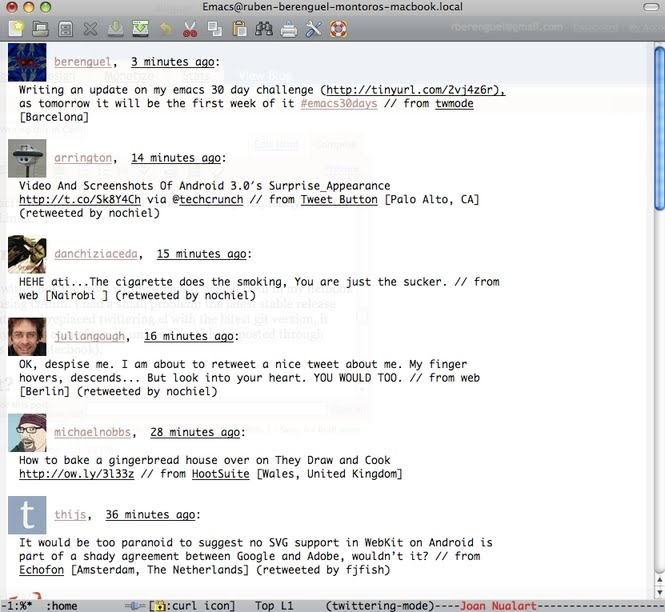
The package Twittering.el is the real deal with twitter posting from within emacs. I have it both in my netbook and Mac, and it works flawlessly, using OAuth. I had a small problem: the latest stable release didn't work straight in my Mac, but once I replaced twittering.el with the latest git version, it started working. Now almost all my tweets come from it, unless a few I have posted through tweetdeck in the last days (as I was in my Macbook).
And aside from that?
Currently I'm using the same packages I've been using previously. Below comes a digest from my Modes.el, the file where I load all modes I use. I'll talk about most of these during these days.
- AucTeX: The best way to do LaTeX
- Flyspell: Spell checking on the fly on any buffer
- Doc-view: View pdf's directly in emacs
- Slime: whenever I do some Lisp or Clojure, I use slime (Superior Lisp Interaction Mode for Emacs)
- Yasnippet: Started using it as a suggestion to improve my hacks to write faster LaTeX. I don't use it a lot: I find my hacks simpler.
- Gforth.el: Whenever I do some Forth, I use it interactively within emacs
- Cat and mouse: mouse cursor avoidance, your mouse cursor runs from your text cursor to be sure it does not block your view.
- Artist mode: Drawing in ASCII has never been so fun!
- Strokes mode: I stopped using it a while ago... But is so much fun! Control emacs with mouse gestures.
- Org-mode: This is probably the best way to deal with your agenda. I use org-mode in my Ben Nanonote as a portable agenda.
- Pari mode: To interact with the powerful programmable gp-pari "calculator".
- Recentf mode with timid completion: To be able to open recently closed files just by switching buffers
- Iswitchb mode: You should have this activated in your .emacs. Switch buffers with substrings from the name.
- I don't know if it is deprecated, but boxquote.el is wonderful to create boxed comments in C-code, and are automatically re-boxed with rebox.el
- I started using very recently undotree mode, becase I liked a lot emacs-fu's post about undo modes.
- I'm using emms in my Nanonote to listen mp3's. I got a suggestion to use mp321.el, will give it a try later on.
Why I emacsified my Mac?
Here in Spain, yesterday (Monday) and tomorrow (Wednesday) are national holidays. And today (Tuesday) is an optional holiday day, meaning this week we had a really long weekend: 5 days. I was going to Switzerland with my girlfriend, but the treacherous strike of Spanish air controllers left me on the ground... With my netbook in my office. That would have mean almost a week without being completely emacs, as my plan was to do it only in the office. After being able to configure gnus without problems in my Mac, I just took the plunge and yesterday I finished all the configuration steps to have all the nice pieces.
As you can see in the first screenshot (the conkeror one), I just have 6 application icons in my dock now: Finder, emacs, iTunes, Settings, Preview and conkeror. And I could remove iTunes, Settings and Preview!
Stay tuned for more information on the challenge! Also, consider joining me and asking for specific configuration steps in the comment section.
As you can see in the first screenshot (the conkeror one), I just have 6 application icons in my dock now: Finder, emacs, iTunes, Settings, Preview and conkeror. And I could remove iTunes, Settings and Preview!
Stay tuned for more information on the challenge! Also, consider joining me and asking for specific configuration steps in the comment section.
The "Related posts" method I use involves Javascript, thus it doesn't work in the RSS feed. To view related posts, please refer to the original article. Thanks!
23/11/2009 - More #SongsInCode
Last Friday, 20, all SongsInCode'rs were asked to try to get #songsincode trending again to commemorate the 3 months anniversary of the idea. I submitted 3 songs (far less than my first outburst)... and almost no-one else tried to overwhelm twitter with his songs (a few did, and with great ideas ;)KISS - know="you cry";know++="Walk street beside her"; PassBy(); everybody: puts("Looks good"); you:
18/10/2009 - Songs In Code
A few days ago I found a page via StumbleUpon, and caught my inner geek. Songs in code, a trend in twitter a few days ago. Other examples here, and here (twitter). Below my own creations.(setq My '(sleeping)) - Roxettedo{love( );}while(TRUE); - The Beatleswhile(1){puts("Young");} - Alphavillelove( ); puts("Now"); - Roxettedo{ }while(b*tchslaprappin&&cocainetongue); - Guns N' Rosesif(!say){say=


