

Nombre de resultats 25
per a How-to
07/06/2012 - Language Detection in Python with NLTK Stopwords
Lately I've been coding a little more Python than usual, some twitter API stuff, some data crunching code. The other day I was thinking how I could detect the language a twitter user was writing in. Of course, I'm sure there is a library out there that does it... But the NLTK library (the Natural Language Toolkit for Python) does not have any function for this, or at least I was not able to find it after 5 minutes of Google search. So...
I had a simple enough idea to determine it, though. NLTK comes equipped with several stopword lists. A stopword is a very common word in a language, adding no significative information ("the" in English is the prime example. My idea: pick the text, find most common words and compare with stopwords. The language with the most stopwords "wins".
Implementing it was just a matter of a few minutes and around 45 lines.
from nltk.corpus import stopwords

def scoreFunction(wholetext):
    """Get text, find most common words and compare with known
    stopwords. Return dictionary of values"""
    # C makes me program like this: create always empty stuff just in case
    dictiolist={}
    scorelist={}
    # These are the available languages with stopwords from NLTK
    NLTKlanguages=["dutch","finnish","german","italian",
"portuguese","spanish","turkish","danish","english",
"french","hungarian","norwegian","russian","swedish"]
    # Just in case I add stopword lists
FREElanguages=[""]
    languages=NLTKlanguages+FREElanguages
    # Fill the dictionary of languages, to avoid  unnecessary function calls
    for lang in NLTKlanguages:
        dictiolist[lang]=stopwords.words(lang)
    # Split all the text in tokens and convert to lowercase. In a
    # decent version of this, I'd also clean the unicode
    tokens=nltk.tokenize.word_tokenize(wholetext)
    tokens=[t.lower() for t in tokens]
    # Determine the frequency distribution of words, looking for the
    # most common words
    freq_dist=nltk.FreqDist(tokens)
    # This is the only interesting piece, and not by much. Pick a
    # language, and check if each of the 20 most common words is in
    # the language stopwords. If it's there, add 1 to this language
    # for each word matched. So the maximal score is 20. Why 20? No
    # specific reason, looks like a good number of words.
    for lang in languages:
        scorelist[lang]=0
        for word in freq_dist.keys()[0:20]:
            if word in dictiolist[lang]:
                scorelist[lang]+=1
    return scorelist

def whichLanguage(scorelist):
    """This function just returns the language name, from a given
    "scorelist" dictionary as defined above."""
    maximum=0
    for item in scorelist:
        value=scorelist[item]
        if maximum<value:
            maximum=value
            lang=item
    return lang
Well, does it work? Quite! I tested it with some Wikipedia text:
But it breaks with non-ascii text (like accents, umlauts and other funny letters,) so it is quite un-useful in these cases. But oh well, for 10 minutes of coding it's not that bad, a quick hack.
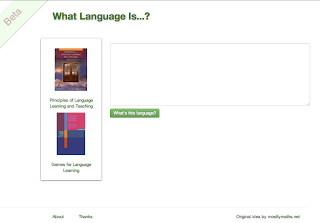
Since last week I had started to read the django book, I thought this would make for an interesting first project to post online, and you can find it at whatlanguageis.com, with some unicode improvements. It's still in very early beta, working with just a handful of languages and without any kind of text-length checker. Just a proof of concept about my django "skills."
scoreFunction("e Operationen in der Karibik, ohne dass es dabei zu größeren Seeschlachten gekommen wäre. In Europa war die erfolglose Belagerung des britischen Stützpunktes Gibraltar die einzige nennenswerte Auseinandersetzung. Der englisch-spanische Konflikt endete formell am 9. November 1729 mit dem Abschluss des Vertrages von Sevilla und der Wiederherstellung des Status quo ante. Die grundsätzlichen Differenzen beider Staaten wurden jedoch nicht beseitigt, was kaum zehn Jahre später zum Ausbruch eines weiteren Krieges führte")
{'swedish': 0, 'portuguese': 0, 'english': 2, 'hungarian': 0, 'finnish': 0, 'turkish': 0, 'german': 5, 'dutch': 3, 'french': 1, 'norwegian': 1, 'catalan': 0, 'spanish': 0, 'russian': 0, 'danish': 1, 'italian': 1}
scoreFunction("Man vet forholdsvis lite om Merkur; bakkebaserte teleskop viser kun en opplyst halvmåne med begrensede detaljer. Mye av informasjonen om planeten ble samlet av Mariner 10 (1974–76) som kartla rundt 45 % av overflaten.")
{'swedish': 3, 'portuguese': 0, 'english': 0, 'hungarian': 0, 'finnish': 1, 'turkish': 1, 'german': 0, 'dutch': 2, 'french': 1, 'norwegian': 4, 'catalan': 1, 'spanish': 1, 'russian': 0, 'danish': 2, 'italian': 0}
scoreFunction("A transit of Venus across the Sun takes place when the planet Venus passes directly between the Sun and Earth, becoming visible against the solar disk. During a transit, Venus can be seen from Earth as a small black disk moving slowly across the face of the Sun")
{'swedish': 0, 'portuguese': 2, 'english': 9, 'hungarian': 2, 'finnish': 0, 'turkish': 0, 'german': 0, 'dutch': 1, 'french': 1, 'norwegian': 0, 'catalan': 1, 'spanish': 1, 'russian': 0, 'danish': 0, 'italian': 1}
But it breaks with non-ascii text (like accents, umlauts and other funny letters,) so it is quite un-useful in these cases. But oh well, for 10 minutes of coding it's not that bad, a quick hack.
Since last week I had started to read the django book, I thought this would make for an interesting first project to post online, and you can find it at whatlanguageis.com, with some unicode improvements. It's still in very early beta, working with just a handful of languages and without any kind of text-length checker. Just a proof of concept about my django "skills."

27/03/2012 - Aprende a recordarlo todo: el método del palacio de la memoria
Puedes leer la versión inglesa de este post aquí: Learn to remember everything: the memory palace method
En este post os voy a enseñar cómo recordar a la perfección una lista. No importa la longitud de la lista: puede ser tu lista de la compra de 10 artículos, o una lista con 50, 100 o incluso 1000 cosas. Y en un próximo post, cómo aplicar este método para aprender idiomas. Suena bien, verdad?
La técnica que vamos a aprender se llama el palacio de la memoria, también conocido en inglés como "method of loci" (por la palabra latina locus, que quiere decir lugar,) aunque en ingles lo más habitual es memory palace o mind palace. Este método es una herramienta fantástica de la que disponer!
El palacio de la memoria
El método del palacio de la memoria tiene sus origines en el siglo 5º A.C., cuando Simonides de Ceos, poeta, atendía un (poco afortunado) banquete en Tesalia. Mientras iba a la puerta a atender a un correo que preguntaba por él, el techo del comedor se derrumbó, matando a todos los comensales. No había manera de reconocer los cadáveres (aplastados por un techo...,) las técnicas de CSI no estaban tan avanzadas como en la tele. Pero Simonides se dio cuenta que no tenía ningún problema en recordar quien estaba dónde, sin prácticamente ningún esfuerzo.
Piénsalo por un momento: es fácil recordar quien se sienta al lado del anfitrión, dónde estaban tus amigos, quien estaba a su lado. Y así, llenas una cena. A Simonides "se le encendió la bombilla," y gracias a esto está considerado como el inventor del método del palacio de la memoria. Aunque usado ampliamente en la antigüedad, no hay prácticamente registros escritos del método: aparece en la obra anónima Rhetorica ad Herrenium y en la obra de Cicerón De Oratore. Pero no es extraño que no haya registro escrito, para ellos sería tan normal escribir un libro sobre el palacio de la memoria como para nosotros escribir un libro sobre cómo ponerse unos pantalones. Todo el mundo saber hacerlo.
El palacio de la memoria es un método cercano a cómo nuestro cerebro funciona. En nuestros días de nómadas cazadores-recolectores necesitábamos saber cómo llegar a algún sitio (lago, llanura) y recordar qué había ahí (agua fresca, fruta, caza). Aprovechando este hecho podemos construir una gran cantidad de métodos de memorización, para listas ordenadas o desordenadas.
Recordar listas puede sonar estúpido, quien quiere memorizar una lista? Pero en el fondo, una lista es un conjunto de conocimientos ordenados! Lo que estudias para un examen de historia es una lista de fechas (ordenada) conectada con hechos (que son sub-listas de la lista principal). Cuando aprendes una nueva receta, es una lista. Un número de teléfono es una lista de números. Un poema es una lista de frases.
Tu primer palacio de la memoria: construcción y llenado

Empecemos a crear nuestro primer palacio de la memoria. El hecho que se le llame palacio no tiene que hacernos pensar en Sissy o películas de Walt Disney, no tiene porqué ser un palacio. De hecho, para empezar, podrías usar tu casa, y como ejemplo imaginaremos una casa muy pequeña. Entrando por la puerta llegamos a un pequeño recibidor, que nos lleva a un comedor con 3 puertas. Del comedor podemos llegar a la cocina, al WC y a la habitación, que tiene un balcón. Este es un ejemplo de casa que vamos a utilizar, para usar el método correctamente deberíamos usar nuestras casas, o otros sitios reales que conozcamos bien.
Ahora memoricemos algo. Una lista de la compra: lechuga, bacon, aros de cebolla, una tarjeta SD y naranjas. He usado una lista corta para hacer el post más corto y para que quepa bien en la casa imaginaria que hemos construido un poco más arriba: prueba con una lista más larga después de esta si no crees que el método funciona!
Para recordar la lista, tenemos que colocar cada elemento en algún sitio de nuestro palacio de la memoria. Esto quiere decir un elemento por habitación o varios elementos por habitación, cada uno en un sitio especial que podamos recordar fácilmente. La manera más simple es poner cada objeto en una habitación diferente. Así, nuestra pequeña casa de 5 habitaciones podría contener una lista de 5, 10 o 15 elementos.
Para colocar un elemento de la lista, tenemos que visualizarlo en la habitación, para asegurar que lo memorizamos, tiene que ser una imagen extremadamente rara. Tiene que dejar una impresión clara, para hacerlo tiene que ser sorprendente, surrealista o sexual, entre otras opciones. Si la imagen es insulsa, recordarla será prácticamente imposible.
Empecemos con la lista. Cuando entramos por la puerta principal, nos saluda la Rana Gustavo, pero un Gustavo especial, hecho de lechuga, como una lechuga parlante. Puedes imaginarlo? Notar el frescor de las hojas de la rana Lechugo? En el comedor hay una estampida de cerdos... perseguidos por Kevin Bacon armado con un tenedor y cara de hambre. Lo bastante raro como para recordarlo? En la cocina, Scarlett Johansson juega con un hoola-hop que es en realidad un aro de cebolla gigante. Entras en la habitación, y te sorprende darte cuenta que la cama es una tarjeta SD gigante, que puedes esconder contra la pared como cuando pones una tarjeta en una cámara. Para acabar, abres el balcón y te encuentras una naranja gigante y brillante haciendo de sol, goteando zumo de naranja sobre el desierto que se abre bajo tu ventana.
Las imágenes debes ponerlas en un sitio que conozcas como la palma de tu mano: tu casa, la casa donde creciste, tu oficina. Esto es muy importante. En este ejemplo he usado una casa imaginaria porque es más fácil, pero en las listas que quieras memorizar, usa sitios conocidos.
Quizá creas que el método no funciona, pero te sorprendería. Escribí la primera parte de este post al empezar la tarde, y ahora, más de 3 horas más tarde al ponerme con la segunda parte aún veo claramente las imágenes. Evidentemente esta es una lista muy corta... Pero no importa: te sería igual de fácil recordar una lista 5 veces más larga.
Encontrar un conjunto de palacios de la memoria
Para recordar una gran cantidad de cosas necesitas una gran cantidad de sitios para poner todos esos recuerdos. Necesitarás encontrar tu propio conjunto de palacios de la memoria. La primera vez que me encontré con este problema, pensé en crear sitios imaginarios (como el pequeño piso que hemos usado más arriba,) conectados de alguna manera con pasillos. El problema? Los palacios artificiales se desdibujan con mucha facilidad, y tiendes a olvidarte de ellos. Es mucho, mucho mejor usar sitios habituales, o que al menos puedes comprobar de nuevo en la vida real, como fotos de un libro, niveles de un juego de ordenador o algún edificio al que puedes volver.
Una vez me di cuenta de esto, empecé a pensar en casas y sitios que pudiera usar... Y me di cuenta que tenía una gran cantidad. Aún recuerdo (y seguro que tu también!) las casas de compañeros de clase de hace 15 años, hoteles en los que he estado, edificios que he visitado. Estoy seguro que podrás encontrar una gran cantidad de sitios que te sirvan de palacios de la memoria. Para empezar, usa sitios muy habituales, como tu casa o oficina, y a medida que cojas práctica podrás usar otros sitios más antiguos.
Puedes leer más sobre encontrar sitios que usar en este post en inglés: Building Your Memory Palace Collection
Palabras finales
Tienes que encontrarle el truco al método. Consigue experiencia convirtiendo objetos habituales (como una lechuga) en imágenes que puedas recordar durante mucho tiempo (como Gustavo el cabeza-lechuga). Cogerle el ritmo es solo cuestión de práctica, igual que pasear por tus palacios en tu cabeza. Práctica, práctica, práctica.
Por cierto, puedes recordar todavía la lista de la compra?
Te ha parecido interesante este post? Si lo ha sido, cuélgalo en Facebook o Twitter!

21/03/2012 - The Mind Palace Memory Technique (or: what I'm watching on TV lately)
Lately I've been watching an interesting TV series. Sherlock, the modern version of Conan Doyle's stories and novels. It is written by Steven Moffat, one of the writers of the new incarnations of Doctor Who, another series I enjoy a lot. Two seasons have come and go (they only have 3 chapters each,) so far both excellent. But I'm not writing this post to (just) praise a TV series, after all I'm not a TV fan whatsoever. What I want to highlight is the appearance of the "mind palace" (as Sherlock named it) in some chapters, another way to put the more widely used memory palace. I have already written a post about how to use the memory palace technique, working as quite an introduction to the subject. But I want to retake it again, since some popular occurrences of the memory palace are pretty... odd.
Setting aside classical titles on memory or memory techniques, and the (somewhat) known book The Memory Palace of Matteo Ricci, the first best-seller book I know giving some hints about the method is Harris' Hannibal, the prequel to Silence of the Lamb. In it, Hannibal Lecter explains how he stores all his memories and knowledge in an intricate memory palace. Anything from poems to maps. In Sherlock, Sherlock Holmes is also depicted as using this method to remember a London map, before chasing a cab using his knowledge of one-way routes and construction sites. In another chapter, he is also shown deep in search of data in his mental library. But is it really like this how it works?
First, for newcomers who don't want to read my lengthy article about the memory palace method, let's make a thought experiment to realise how powerful the method is. Close your eyes. Can you picture your parents (or grandparents) house? Mentally walk from room to room? I bet you can, even if your parents have moved since then. Can you walk mentally the route from your parents' home to your school, or high school? I'm sure you can do it without any problem. Your brain is hardwired for this: finding routes. After all, a hunter-gatherer unable to remember where the plants or the water lay was doomed to die.
The memory palace method aims to take advantage of this ability, paired with our visual memory and linking memory to remember... lists. In fact, you don't need to remember lists, but the method is best suited to listed knowledge, since you can remember it ordered. The simplest example would be a shopping list. If you want to go shopping and need milk, onions and some tasty dressing (making some onion rings, maybe?) you can place each item in... your grandparents home. Or along the route to your high school. Problem is, done plainly forgetting it's too easy. You are likely to walk over the 3 onions you placed in the middle of your parents living room. To remember, you have to make everything bigger, noisier and bizarre. Cleopatra (the Egyptian pharaoh of old) bathing in milk in the bathroom (in case you didn't know, Cleopatra is said to bathe in donkey milk). A giant onion-man eating sliced humans in the living room. A bride (well dressed with her wedding dress) covered in ketchup. Far easier to remember, don't you think?
On the other hand, the fictional cases of memory palaces showin in Hannibal and Sherlock are far more abstract. How are you supposed to remember poems or a map? Well, all you need is a code. To memorise a poem you need to remember its verse and rhythm. For Keats' Ode on a Grecian Urn, you'd start (again) with a bride, dressed in white with a finger to his lips, ordering silence. Then a boy appears out of nowhere, carrying a huge golden pocket clock in his neck, also gesturing for silence. And so on and so forth. One (or two) images for each verse are almost all you need. Pair it with some repetitions of the poem to get the hang of the rythhm and you'll never be able to forget it.
And how are you supposed to remember a full map? Well, this one is trickier and I still don't know how to remember a plain map. Remembering directions is somehow easy: just store a direction in each room of your palace: turn left, go straight and right on the 3rd is just "1 left" "straight 3 right", which are easier to encode in rooms in a palace. For a map, I don't know and I don't think Sherlock or Hannibal could help us.
Of course if you have a good enough visual memory (or even eidetic memory like Sheldon Cooper in The Big Bang Theory) you could remember the full map. But this is just being born with the right genes, and I'd rather know how to do it myself.

08/05/2011 - Building Your Memory Palace Collection
Do you want to have very good memory? I do, in fact I've been interested in it since my school days. There are some techniques that exploit your brain's natural power, and the one I'm covering here is the memory palace technique.
I have already written about the memory palace memorisation technique (go and read the previous post if you don't know what I'm talking about), but I did not cover a very important point there: Where can you find memory palaces to use in your memorisation?
I have already written about the memory palace memorisation technique (go and read the previous post if you don't know what I'm talking about), but I did not cover a very important point there: Where can you find memory palaces to use in your memorisation?
Why we may need a very big array of palaces
Not everyone has the same memorisation needs, as not everyone needs the same computing power. Some people are fine with netbooks, and some people need big multi-chip clusters. In memorisation, the same applies. Some memory masters try to memorise pi to very big lengths, a feat that requires a huge number of multi-room memory palaces perfectly stacked.
Obviously you may not need to memorise pi, but maybe you enjoy memorising poems or history facts and need more than the occasional shopping list enabled memory palaces. Let's see how we can enhance our mental landscape.
Obviously you may not need to memorise pi, but maybe you enjoy memorising poems or history facts and need more than the occasional shopping list enabled memory palaces. Let's see how we can enhance our mental landscape.
What to do with the 'palaces' you will find
In this post I'll give you a way to find suitable locations to use as memory palaces. What you need to do is write the list down together with a brief description and a list of rooms. If you are artistically inclined, try to draw a plan (or if you are very artistically inclined, draw the interior of the rooms!) of the buildings or routes, as this will burn them more clearly in your brain. At the very least you should write down the palace and the set of rooms.
Warming up: your home and known towns
As you may remember from the memory palace memorisation technique post (if you don't, maybe you should put it in a memory palace?) a memory palace does not need to be a house or palace: it can be anything that has some spatially ordered qualities. For example, a journey through a known town (like from your house to your office) or the stops in your underground route.
The first set of memory palaces you can create is the most basic and the one you should be using since the beginning. Your current home, the house were you were raised and the routes from these to your work and your school/highschool. These are the basic blocks that you should be using for your shopping lists, to-do list and similar very frequent tasks.
These are the basics mostly because you don't need any effort to picture them clearly in your mind, you don't even need to write them down (but you should, just to see how many palaces you have).
The first set of memory palaces you can create is the most basic and the one you should be using since the beginning. Your current home, the house were you were raised and the routes from these to your work and your school/highschool. These are the basic blocks that you should be using for your shopping lists, to-do list and similar very frequent tasks.
These are the basics mostly because you don't need any effort to picture them clearly in your mind, you don't even need to write them down (but you should, just to see how many palaces you have).
Getting deeper: Offices and frequent routes
The next source of good memory palaces are also in your day-to-day habits. Your office (or offices, or workplace), covering also your boss' office and co-workers den. Add to this list your walking routes around all of these, which should be between 3 and 15 memory palaces.
Now think about your frequent routes: from your house to your parents' place, from your house to the bakery and so on. The kind of walks you do weekly (or more frequent) but not the standard work commute.
These are pretty basic, too: they are always in your radar, as you are seeing them frequently.
Now think about your frequent routes: from your house to your parents' place, from your house to the bakery and so on. The kind of walks you do weekly (or more frequent) but not the standard work commute.
These are pretty basic, too: they are always in your radar, as you are seeing them frequently.
Get exotic: holidays, foreign cities, travel routes
The next set is a little more 'foreign'. If you have been to some foreign city on holiday, you can use it as a memory palace. It will be a little harder to visualise it at first, but just take a look at your pictures or browse Google images for it. I can picture pretty easily Reykjavik (or at least some of its places), but I can use a lot of place-makers in Iceland following the route of our road trip around Iceland. You can do as well with your past holidays: in addition to being a good memory palace, the fond memories you may have will improve your mood.
This set is a little harder, but with a little help from your picture books and Google images you can use the wonderful landscapes you've been as memorisation aides.
This set is a little harder, but with a little help from your picture books and Google images you can use the wonderful landscapes you've been as memorisation aides.
Want it all: friends and relatives houses
You can now get a huge boost to the number of palaces by adding your current friends and relatives homes. Here I should add a recommendation: if you can't visualise properly some room of a friend or relative... It is no big deal. Just leave it empty or add some plain furniture. If you ever get back to that place, update your memory palace. The only point you need is a clear mental image, not a clear correct mental image. By adding these memory palaces you may be able to add between 10 and 30 (or even 40!) memory palaces to your list. Sounds like a lot, doesn't it?
You have to be a little more careful with these, as visiting a friend and discovering the plan is completely different can disrupt your memory for that particular palace. In practice, if you have been to a house and visited all rooms, you should be able to visualise them without any problems. If you have not been to a particular room, you can choose between creating your own picture or just keeping it closed. If you are sure you won't enter it ever, create your own: there will be no problems!
You have to be a little more careful with these, as visiting a friend and discovering the plan is completely different can disrupt your memory for that particular palace. In practice, if you have been to a house and visited all rooms, you should be able to visualise them without any problems. If you have not been to a particular room, you can choose between creating your own picture or just keeping it closed. If you are sure you won't enter it ever, create your own: there will be no problems!
Going overkill: childhood homes and "odd places"
If you want to get all the lot of memory palaces, this is ultimate place. Time-travel to your childhood, and pick all your childhood friends homes. As I advised earlier, if you can't remember something properly, fill it as you wish: this last category is for homes you won't be visiting anytime soon (and if you do, update as needed). Add to this list your forgotten homes like ex's homes and ex-relatives-in-law homes, related routes, previous work routes and the kind of palaces and routes that would have applied to the previous categories for your past-self.
And finally, the odd buildings list. Like your local church or museum, a beloved place in your hometown, special places and similar. Whatever you can visualise you can use as a memory palace, you only need to 'think about it'.
For this list you can use the suggestions from the previous with respect to long-forgotten rooms.
And finally, the odd buildings list. Like your local church or museum, a beloved place in your hometown, special places and similar. Whatever you can visualise you can use as a memory palace, you only need to 'think about it'.
For this list you can use the suggestions from the previous with respect to long-forgotten rooms.
Finishing
Now you should have a pretty long list of memory palaces, with a description of the rooms. And I bet this is a pretty long list! What can you do with it?
Well, a very important task is to get used to all these places again. Pick the list and carry it with you anywhere, and for a week or two just take it out occasionally and read it quickly. After that time, trim the descriptions and test your recall of the places. If some of them are too hard for you to visualise, just remove them from the list. There is no point in wasting effort when your list should be long enough already.
When you are profficient in traveling your new memory palaces, you just need to use them. To memorise what? Well, this is up to you now!
Well, a very important task is to get used to all these places again. Pick the list and carry it with you anywhere, and for a week or two just take it out occasionally and read it quickly. After that time, trim the descriptions and test your recall of the places. If some of them are too hard for you to visualise, just remove them from the list. There is no point in wasting effort when your list should be long enough already.
When you are profficient in traveling your new memory palaces, you just need to use them. To memorise what? Well, this is up to you now!
If you have enjoyed this one you may also like:
- Learn To Remember Everything: The Memory Palace Memorisation Technique
- Remembering Facts: Using Mental Associative Chains

05/04/2011 - Remembering Facts: Using Mental Associative Chains

This is a method I use to complement the memory palace technique to remember facts, either historical, about people or any other subject. It is pretty simple and follows the same principles as the memory palace: you need to make up bizarre images. To memorise facts we just need to attach keys to each fact, and link them to the subject or person we are considering. Forming a chain of images. Simple, huh? Let's try!
As an example in this post we will work with a person facts. Consider the bio snippet of Icelandic writer Halldór Laxness from Wikipedia:
As an example in this post we will work with a person facts. Consider the bio snippet of Icelandic writer Halldór Laxness from Wikipedia:
Halldór Kiljan Laxness [ˈhaltour ˈcʰɪljan ˈlaxsnɛs] (born Halldór Guðjónsson) (April 23, 1902 – February 8, 1998) was a twentieth-century Icelandic novelist, poet, and essayist; author of Independent People, The Atom Station, and Iceland's Bell. He won the Nobel Prize in Literature in 1955.
We have a few numbers and books to relate with him. I assume implicitly that I will always remember his nationality (something which may not be true in all cases) but you can treat nationality in the same way that we will treat book names. First, we need some kind of placeholder. If you have read some of his books you could use some place or city appearing in them. As I know (and even saw) he had a white '69 vintage Jaguar, this will be my placeholder. Let's start with the dates.
Remembering numbers
There are several techniques you can use to remember numbers and years. Usually, in the hard-core memorisation books it is suggested to use something called the major system, where you assign to each number a letter or a few letters, and then you form words with them. This word will be the key to decode the numbers. It is comprised of the following number-sound combinations:
| Number | Sounds | Memory tip |
| 0 | s, z, soft c | z is the first letter of zero |
| 1 | d, t, th | d and t have one downstroke |
| 2 | n | two downstrokes |
| 3 | m | 3 downstrokes |
| 4 | r | last letter of four |
| 5 | l | L is the roman 50 |
| 6 | j, sh, soft ch.. | script j looks like upside 6 |
| 7 | k, hard c, hard g, q | capital script K looks like a pair of 7's |
| 8 | v, f | think of a script f (which has two loops) |
| 9 | b, p | p is the mirror image of a 9, b is a rotation of 9 |
| - | vowels, w, h, y | WHY+vocals: use them anywhere to fill the gaps and form words |
Based on the description from Your Memory : How It Works and How to Improve It (Amazon link , Bookdepository link)
For a while I had tried using another system: mobile phones assign to each number any of 3 letters, except for 0, 1, 7 and 9. The first two are for special signs, the two last have 4 letters. What I did was moving s to 1 and z to 0. To further simplify, I used only consonants and left away the vocals in this. But the major system is in some sense simpler, as it assigns sounds and not only letters. Let's try to use it here.
Let's start then with the date of birth, 23rd of April, 1902. The day and month are trivial to remember: it is the international book day, linked to Cervantes and Shakespeare's death dates. It is also Saint George, a special day in Catalonia. For the year, we can assume we know it is in the 20th century and only encode 02 which result in s/z/soft c + n. Two-letter combination can be tricky to come up, but we can form a few words: son, zone, ozone, sin... If we needed also the century (setting aside the fact that we could create a fixed image for 10 up to 20 to use as century indicator), 1902 would give t/d+b/p+s/z/soft c+n. As you see, forming a word with 4 letters can be even trickier: you should split them in groups of two letters.
Now, add an image to Saint George fighting the dragon. Which word to use? I'll use zone. And what is the image? Saint George (wearing a bib) is playing 1-1 basketball inside the zone being heavily guarded by a big, green dragon. The bib part is to remind me this is birth.
Now, his death 8th February 1998. We can encode month-day combinations (which are not as easy as before: always use tricks if you can) as DMM (0802 or 82) or MMDD (0208 or 28). There is some ambiguity in both choices, and as such you have to play it safe and be consistent. As a Spanish speaker, the natural way of date sorting for me is DDMM, thus I'll use 82: v/f+n. Now 1998, 98 gets b/p+v/f. An anthropomorphic phone eating beef, using as a table a tombstone.
To remember when he was given the Nobel Prize, 55 is l+l, and our writer is named Halldór Kiljan Laxness. Which happens to have two L's in the name. Here I assume I will always remember this, too and create an image of him with his prize, as a reminder that the date is hidden in him.
Let's start to form the images: Laxness sitting in the driver's seat of a pearly white Jaguar, typing furiously in a typewriter, with a Nobel prize in his lap. Behind it Saint George wearing a bib is playing a 1-on-1 basketball game, fighting to get a good position inside the zone against the dragon. Behind the car a big, anthropomorphic phone is eating beef (picture the beef as you enjoy it, taste it mentally... medium, rare?) and using a tombstone as table.
, Bookdepository link)For a while I had tried using another system: mobile phones assign to each number any of 3 letters, except for 0, 1, 7 and 9. The first two are for special signs, the two last have 4 letters. What I did was moving s to 1 and z to 0. To further simplify, I used only consonants and left away the vocals in this. But the major system is in some sense simpler, as it assigns sounds and not only letters. Let's try to use it here.
Let's start then with the date of birth, 23rd of April, 1902. The day and month are trivial to remember: it is the international book day, linked to Cervantes and Shakespeare's death dates. It is also Saint George, a special day in Catalonia. For the year, we can assume we know it is in the 20th century and only encode 02 which result in s/z/soft c + n. Two-letter combination can be tricky to come up, but we can form a few words: son, zone, ozone, sin... If we needed also the century (setting aside the fact that we could create a fixed image for 10 up to 20 to use as century indicator), 1902 would give t/d+b/p+s/z/soft c+n. As you see, forming a word with 4 letters can be even trickier: you should split them in groups of two letters.
Now, add an image to Saint George fighting the dragon. Which word to use? I'll use zone. And what is the image? Saint George (wearing a bib) is playing 1-1 basketball inside the zone being heavily guarded by a big, green dragon. The bib part is to remind me this is birth.
Now, his death 8th February 1998. We can encode month-day combinations (which are not as easy as before: always use tricks if you can) as DMM (0802 or 82) or MMDD (0208 or 28). There is some ambiguity in both choices, and as such you have to play it safe and be consistent. As a Spanish speaker, the natural way of date sorting for me is DDMM, thus I'll use 82: v/f+n. Now 1998, 98 gets b/p+v/f. An anthropomorphic phone eating beef, using as a table a tombstone.
To remember when he was given the Nobel Prize, 55 is l+l, and our writer is named Halldór Kiljan Laxness. Which happens to have two L's in the name. Here I assume I will always remember this, too and create an image of him with his prize, as a reminder that the date is hidden in him.
Let's start to form the images: Laxness sitting in the driver's seat of a pearly white Jaguar, typing furiously in a typewriter, with a Nobel prize in his lap. Behind it Saint George wearing a bib is playing a 1-on-1 basketball game, fighting to get a good position inside the zone against the dragon. Behind the car a big, anthropomorphic phone is eating beef (picture the beef as you enjoy it, taste it mentally... medium, rare?) and using a tombstone as table.
Remembering names
Remembering names is far, far more specific than numbers. We want to remember the names of his most relevant novels (according to the Wikipedia snippet). Independent People, for me, makes me think of the painting La Liberté guidant le peuple. The Atom Station, a big red London-style bus stopping below the Atomium, in Belgium. Iceland's Bell is the Hallgrímskirkja bell swinging full force.
If there is some possibility of forgetting his nationality, use some strong related image to add to your mental placeholder. For Iceland, I could use any image of my road trip around Iceland, but a good one even if you've been there are the images of Eyjafjallajökull erupting just above the car.
We just need to place all these images around the pearly white Jaguar. We can place them in the car's back seats: the painting, a big reproduction of the church and a big red toy bus, each laying in one back seat. I'm counting here on remembering the atom part just from having the image of the Atomium and the bus implicitly. This can also lead to easier forgetting, but sometimes you have to trade off simpler images with perfect recall.
If there is some possibility of forgetting his nationality, use some strong related image to add to your mental placeholder. For Iceland, I could use any image of my road trip around Iceland, but a good one even if you've been there are the images of Eyjafjallajökull erupting just above the car.
We just need to place all these images around the pearly white Jaguar. We can place them in the car's back seats: the painting, a big reproduction of the church and a big red toy bus, each laying in one back seat. I'm counting here on remembering the atom part just from having the image of the Atomium and the bus implicitly. This can also lead to easier forgetting, but sometimes you have to trade off simpler images with perfect recall.
Develop your own keys
This can only get better with practice, and you can use it for people, history or whatever you come up with. Find your own imagery and fill your characters with expression and unforgettable facts. Use your life and previous knowledge as basis to form images (like I used Saint George) that are significant for your mind, don't rely on others for this. As with the memory palace technique, practice makes perfect, and I can assure you that you will be able to store a lot of facts about important people without problems.
Can you still recall the images we have used? And still remember the major system? Remembering the major system can be the tricky part, just keep trying! If you found this post useful, please spread the word!
In case you want to read more:
Can you still recall the images we have used? And still remember the major system? Remembering the major system can be the tricky part, just keep trying! If you found this post useful, please spread the word!
In case you want to read more:
- How to Develop a Brilliant Memory Week by Week: 52 Proven Ways to Enhance Your Memory Skills
(Dominic O'Brian)
- Quantum Memory Power: Learn to Improve Your Memory with the World Memory Champion!
(Dominic O'Brian)
- Maximize Your Memory
(Jonathan Hancock)
- Learn to Remember Everything: The Memory Palace Technique (A post in this same blog)

27/03/2011 - Learn to Remember Everything: The Memory Palace Technique
In this post I'll teach you how to have perfect recall of lists of items. Length is not much of an issue, it can be your shopping list if 10 items or it can be a list with 50, 100 or even 1000. And in a forthcoming post I'll show you how you how to apply this technique to learning new languages. Sounds good, doesn't it?
The technique we'll be learning is called the memory palace, and is also known as the method of loci (for the latin word locus meaning place) and also the mind palace.
The technique we'll be learning is called the memory palace, and is also known as the method of loci (for the latin word locus meaning place) and also the mind palace.
The memory palace
The memory palace technique began in the 5th century B.C., when Simonides of Ceos, poet, was attending an unfortunate banquet in Thessalia. While he was away to talk with a courier who asked for him outside, the hall's ceiling crumbled, killing everyone. There was no way to recognise the corpses... Until Simonides realised that it was no problem to recall who was where, without having done any effort.
Think about it: It is not hard to remember who sits beside the host, where your friends sit, who is beside them and so on. This dawned upon Simonides, and he is credited as the "inventor" of the memory palace technique. Widely spread through antiquity, there was not a lot of written accounts on it: it appears in the anonymous Rhetorica ad Herrenium and Cicero's De Oratore. It is not that strange that there were no written accounts, it is like writing a book about how to put your trousers on. Everybody knows how to do it.
The memory palace is well suited to how our brains have evolved. Back in our nomadic days we needed to know how to get somewhere (the lake, the plain) and remember what was there (fresh water, hunting). By taking advantage of this fact we can build an array of impressive memorisation techniques, to ordered or unordered lists.
Remembering lists may sound lame, who wants to memorise a list...? But lists are just an ordered array of knowledge! What you study for a history exam is a list of ordered dates accompanied by facts and causes (sub-lists). When you learn a new recipe, it is a list. A telephone number is a list of numbers. A poem is a list of phrases.
Think about it: It is not hard to remember who sits beside the host, where your friends sit, who is beside them and so on. This dawned upon Simonides, and he is credited as the "inventor" of the memory palace technique. Widely spread through antiquity, there was not a lot of written accounts on it: it appears in the anonymous Rhetorica ad Herrenium and Cicero's De Oratore. It is not that strange that there were no written accounts, it is like writing a book about how to put your trousers on. Everybody knows how to do it.
The memory palace is well suited to how our brains have evolved. Back in our nomadic days we needed to know how to get somewhere (the lake, the plain) and remember what was there (fresh water, hunting). By taking advantage of this fact we can build an array of impressive memorisation techniques, to ordered or unordered lists.
Remembering lists may sound lame, who wants to memorise a list...? But lists are just an ordered array of knowledge! What you study for a history exam is a list of ordered dates accompanied by facts and causes (sub-lists). When you learn a new recipe, it is a list. A telephone number is a list of numbers. A poem is a list of phrases.
Your first memory palace: building and filling
Let's start by creating our first memory palace. It does not need to be a palace, in fact, it should not. Just think of your home, and as a sample I'll assume is really small: from the door you get to a small hall, connected to a living room which leads to a kitchen, a WC and a bedroom with a balcony. This is a sample, to memorise correctly you have to visualise your home or any other place you may know very well. You can of course use this mental image of an imaginary house, but memorising may be harder, be warned.
Now consider the following shopping list: lettuce, bacon, onion rings, SD card and oranges. We want to memorise it. I picked a short list to make the post shorter and make it fit in our small imaginary home: try your hand with a longer list if you don't believe we can do it with longer lists.
To remember the list, we have to place each item somewhere in our mind palace. This of course can mean one item per room or several items per room, each one in a special spot in the room. The simplest method is to put each item in its own room, when you are confident enough, create additional trapping space in each room. Thus, our small 5-room house could be easily a 5, 10 or 15 places memory palace.
To place an item, we have to visualise it in the room, and to make sure we remember it it has to be an extremely odd image. It has to leave a clear impression and to do so, it has to be surprising, bizarre or sexual, among other options. If the image is dull, remembering it is close to impossible.
Begin with the list. When we enter the front door, we are greeted by Kermit the frog, only that this special Kermit is made of lettuce, like a talking lettuce. Can you see it? Feel the freshness of Lettucit's leaves? In the living room a stampede of pigs followed by Kevin Bacon with a fork should be bizarre and clear enough! In the kitchen, Scarlett Johansson plays hoola-hop with an onion ring. You enter the bedroom, and to your surprise, the bed is a gigantic SD card: you can hide the bed by pressing it in to be read. Finally, you open the balcony to find that the sun is now a big, luminous orange. It starts to drip juice over the desert in front of your window!
You should put all these images in a place you know like the palm of your hand: your home, the house you grew up, your office. This is very important.
You may not believe it works at all, but you will be surprised. I wrote the first part of this post in the afternoon, and now more than 3 hours later I still can see clearly all the images. Of course this is a short list... But it would not matter: you could remember a list 5 times as long as easily as with this one.
Now consider the following shopping list: lettuce, bacon, onion rings, SD card and oranges. We want to memorise it. I picked a short list to make the post shorter and make it fit in our small imaginary home: try your hand with a longer list if you don't believe we can do it with longer lists.
To remember the list, we have to place each item somewhere in our mind palace. This of course can mean one item per room or several items per room, each one in a special spot in the room. The simplest method is to put each item in its own room, when you are confident enough, create additional trapping space in each room. Thus, our small 5-room house could be easily a 5, 10 or 15 places memory palace.
To place an item, we have to visualise it in the room, and to make sure we remember it it has to be an extremely odd image. It has to leave a clear impression and to do so, it has to be surprising, bizarre or sexual, among other options. If the image is dull, remembering it is close to impossible.
Begin with the list. When we enter the front door, we are greeted by Kermit the frog, only that this special Kermit is made of lettuce, like a talking lettuce. Can you see it? Feel the freshness of Lettucit's leaves? In the living room a stampede of pigs followed by Kevin Bacon with a fork should be bizarre and clear enough! In the kitchen, Scarlett Johansson plays hoola-hop with an onion ring. You enter the bedroom, and to your surprise, the bed is a gigantic SD card: you can hide the bed by pressing it in to be read. Finally, you open the balcony to find that the sun is now a big, luminous orange. It starts to drip juice over the desert in front of your window!
You should put all these images in a place you know like the palm of your hand: your home, the house you grew up, your office. This is very important.
You may not believe it works at all, but you will be surprised. I wrote the first part of this post in the afternoon, and now more than 3 hours later I still can see clearly all the images. Of course this is a short list... But it would not matter: you could remember a list 5 times as long as easily as with this one.
Finding an array of memory palaces
To remember a lot of things you need to have a lot of places to put all these memories. You will need to find your own array of memory places. The first time I considered this problem, I thought about creating imaginary palaces, linked somehow by corridors. The problem? Artificial palaces get blurry very quickly, and you tend to forget them. It is far, far better to use real places, or at least places you can revisit in real life, like pictures from a book, levels in a computer game or buildings you can visit.
Then I started to think about houses and places I could use... And I found that there are plenty. I still remember school mates houses from 16 years ago, hotels I've been, buildings I have visited. I am sure you will find a huge array of places you can use. To begin with the technique, use very known places, like your house or office and as you get more confident with the technique, start using older places.
Then I started to think about houses and places I could use... And I found that there are plenty. I still remember school mates houses from 16 years ago, hotels I've been, buildings I have visited. I am sure you will find a huge array of places you can use. To begin with the technique, use very known places, like your house or office and as you get more confident with the technique, start using older places.
Final words
You have to get the knack of the method. Get some degree of experience in converting everyday objects (like lettuce) into long-lasting impressions (like Kermit the lettuce-head). This only comes with practice, like walking around your images of memory palaces. Practice, practice, practice!
By the way, can you recall the shopping list above?
If you found this post useful, please share it with your friends.
In case you want to read more:
- Moonwalking with Einstein: The Art and Science of Remembering Everything
(Joshua Foer)
- How to Develop a Brilliant Memory Week by Week: 52 Proven Ways to Enhance Your Memory Skills
- Quantum Memory Power: Learn to Improve Your Memory with the World Memory Champion!
- Maximize Your Memory

09/12/2010 - Commented Version of the LaTeX File to Create PDF ebooks and A6 Booklets
Below you can find a commented version of the LaTeX template I used to create two free ebooks and A6 booklets. Now you can tweak it as much as you like it!
The syntax highlighted TeX code comes from the htmlize package in emacs, to keep with my emacs 30 Day Challenge.
The syntax highlighted TeX code comes from the htmlize package in emacs, to keep with my emacs 30 Day Challenge.
\documentclass[9pt,openany,final]{memoir}Be sure to check the free ebooks I posted using this template: The Art of War and How to Live on 24 Hours a Day.
% Set the font size with 9pt. Openany states that a chapter may start
% in either page (recto or verso in publishing language). Final is the
% way to say memoir to remove any comment crap we may have
\usepackage[pdftex]{graphicx}
\usepackage[english]{babel}
\usepackage{xcolor}
\usepackage[latin1]{inputenc}
\usepackage{wrapfig}
\usepackage{fix-cm}
% fix-cm is a package to use arbitrary font sizes. I wrote about it in
% http://www.mostlymaths.net/2009/03/big-fonts-in-latex.html
\usepackage[pdftex, colorlinks=true, linkcolor=black,
urlcolor=blue]{hyperref}
% hyperref makes for clickable links inside a pdf and the table of
% contents. You can choose different colors as showed
\usepackage[activate={true,nocompatibility}]{microtype}
% Microtype allows you to make a lot of nasty things to typography:
% adjust kern spacing, font protrusion and font expansion. I think I
% don't use it here (I use the fix-cm version), but the original
% template I used did
\usepackage[paperwidth=9cm, paperheight=12cm, hmargin={1cm, 1cm},
vmargin={1.2cm, 0.8cm}]{geometry}
% The geometry package allows you to set paper sizes. I tweaked it a
% little until the size looked good. You can leave it as is and tweak
% once you have everything written.
\widowpenalty 3999
\clubpenalty 3999
% Options for word and line breaking
\makeoddfoot{ruled}{}{}{}
\makeevenfoot{ruled}{}{}{}
% memoir options for footers. I leave them empty, with a ruled line
\makeevenhead{ruled}{\footnotesize
\emph{\rightmark}}{}{\footnotesize\scshape The Art of War, \thepage}
% Headings from memoir (even)
\makeoddhead{ruled}{\footnotesize
\emph{\rightmark}}{}{\footnotesize\scshape The Art of War, \thepage}
% Headings from memoir (odd)
\copypagestyle{chapter}{plain}
% This copies the page style from "plain" to the first page of a
% chapter. A hack in the memoir class, redefining chapter didn't work
\makeevenfoot{chapter}{}{}{}
\makeoddfoot{chapter}{}{}{}
% Clean footers for chapters
\pagestyle{ruled}
% I don't know why I state this, as all headings are already ruled.
\emergencystretch=\maxdimen
\hyphenpenalty=10
\hbadness=10000
% More options for line and word breaking
\setcounter{errorcontextlines}{999}
% I used this for debug purposes. Can be removed
\definecolor{gray}{gray}{0.77}
\definecolor{darkgray}{gray}{0.4}
\definecolor{black}{gray}{0}
% Color definitions in grayscale
\setlength\beforechapskip{-10pt}
\setlength\midchapskip{5pt}
\setlength\afterchapskip{10pt}
% These lengths are standard memoir names used for chapters. I just
% tweaked the values until I liked the result.
% Now I define a new chapter style, to be used through all the
% document. I think the commands are self-explanatory: I use
% renamecommand to change how the chapter will look like
\makechapterstyle{plroman}{
\renewcommand\chapterheadstart{\vspace*{\beforechapskip}
{\color{darkgray}\centering\MakeUppercase
{\fontsize{0.7in}{0.7in}\selectfont\romannumeral\thechapter}
\par\nobreak\vskip1\midchapskip\hrule\vskip0.5\midchapskip}\color{black}}
\renewcommand\chapternamenum{}
\renewcommand\printchaptername{}
\renewcommand\printchapternum{\centering\MakeUppercase
{\fontsize{1in}{2in}\selectfont\romannumeral\thechapter}}
\renewcommand\chaptitlefont{\huge\centering\color{black}
\vskip0.5\midchapskip\vskip0.5\midchapskip}
\renewcommand\afterchapternum{}
\renewcommand\afterchaptertitle{\vskip0.5\midchapskip\vskip\midchapskip
\hrule\vskip\midchapskip\vskip\midchapskip\vskip\midchapskip}
}
% Use this chapter style
\chapterstyle{plroman}
% Some more chapter & table of content redefinitions
\renewcommand{\cftchapterfont}{\scshape\mdseries}
\renewcommand{\cftchapterleader}{\dotfill}
\renewcommand{\cftchapterpagefont}{\scshape\mdseries}
\renewcommand{\chapternumberline}[1]{\hspace*{-5em}
\vbox{\hfil\hsize=7.5em\MakeUppercase
{\mdseries\romannumeral#1}.\
\hfilneg}}
\renewcommand{\cftchapterbreak}{}
\begin{document}
% Now the content!
\include{taow}
\end{document}
Related posts:
The "Related posts" method I use involves Javascript, thus it doesn't work in the RSS feed. To view related posts, please refer to the original article. Thanks!
02/11/2010 - How I Got More Than 4500 Visits Through Blog Commenting

Visits from one of my comments
Last September, to help me with my goal of increasing my RSS subscribers to 200 I ran an experiment with blog commenting. I was curious on how blog commenting related to visits, subscribers, and which blogs could be better targets for it.
The experiment:
I commented on several blogs each day, writing down the date and where I commented. Then, when a comment turned 7 days old I checked how many visits my blog got from this particular comment, and repeated when it turned 14 days.
Noting down all this data was quite tiring at first, but once I got used to this, it became second nature. Tracking down the visits with Google Analytics is more tiring. I still do it today, as it helps in knowing where blog commenting is more effective.
How I got that many visits? Lessons learned
There are several important things to consider when blog commenting, some I already knew before I started, some I learned during the experiment
1. Comment only in posts that interest you: You should comment in posts that you have read and enjoyed, posts that you think may turn you into a subscriber to that particular blog (if you are not already).
2. Add value: The most common advice with blog commenting, and I can't stress this enough. Adding value is adding an interesting point to the post, or arguing with some point you disagree, linking to a post (even if it is not in your blog!) where you think there is more information. Don't comment to say Hey good work, go check my blog!
3. Always add a link: Add a link in the content of your comment to a relevant post in your site. Of course, this results in a lot of comments landing in the awaiting for approval queue in most commenting systems, but if your comment is not spammy it will get through 99 times out of 100. You may wonder if the link to your blog from the comment isn't enough. It isn't. Roughly 30% of my comments had no content link. These resulted in less than 20 visits. If you can't manage to link to a related post, you can add a link to your latest post as a mean of signature, but try to link to at least something related to the post you just read.
4. Promote posts where you comment: This is a key and frequently overlooked point. Submit them to Reddit, StumbleUpon, Delicious and share them on Twitter. If you are true to point #1, this should not be a problem.Think of this like an investment: your comment accounts maybe for 0.1% of all the visits this post will get. This could be 1000 visits if you are lucky and it becomes a viral post, promote it like you would do with your own posts.
5. Try to land one of the first 5 comments: If you can't get yourself one of these spots, it is very unlikely that you will get visits from it.
6. Look for interesting posts constantly: Scan social networks for interesting posts to comment. Give frequent looks to the new section in Reddit or Digg for recent posts to comment on. Follow bloggers you like in twitter, and read their new posts as soon as they tweet them. Comment only if #1 applies, of course.
More details on the numbers
I wrote 114 comments and 6 of them never got approved or landed in a blog about to die. Of these comments, 9 had more than one link on them and 39 didn't have a link in the comment.
Two comments account for 75% of my comments.
One was luck: I just visited a high profile blog when a new post appeared. It was interesting and I had an interesting link to go with it... A win-win scenario, ended with 1180 visits and it stills gives some odd visits (20 per week or so).
The other comment was hard work (and luck, but chance favours only to the prepared): I had been monitoring a social news aggregator for 30 minutes and a very interesting story appeared. With viral potential. I wrote a short intriguing comment with a single link on it. After two weeks, 2100 visits and it still results in a few visits each week. I just checked, and tracked how many visits I got after the two weeks, 600 more.
The remaining 1280 visits come from persistence. Lots of interesting comments end up in quite a few interested visits, who spend at least a few seconds scanning content. Or even subscribing.
Observe that I am counting visits with referrer URL. In the image in the beginning of the post, the linked page in my blog had 2515 total visits but only 1843 referred visits.
Summarising, this was through:
46% Hard Work (and a little luck)25% Luck29% Persistence
Did you enjoy this post? Share it with your friends through Twitter, Reddit or Facebook!
 Book Review: The War of Art, by Steven Pressfield (highly recommended book)
The "Related posts" method I use involves Javascript, thus it doesn't work in the RSS feed. To view related posts, please refer to the original article. Thanks!
21/08/2010 - Arch Linux in my Acer Aspire One
Last Tuesday I made the move. I ditched Ubuntu and installed Arch Linux in my laptop. After my post Linux is a time killer (which attracted a lot of attention, and didn't really carry the message I wanted) I got a lot of comments to think about. The two most suggested Linux distributions were Debian/unstable and Arch Linux. Well, maybe Arch Linux was not that talked about, but the following comment bought me out:
[...]I had used and installed Debian previously, knew it wasn't a thrilling experience. Thus, giving Arch Linux a try (while implementing some disaster-preventing solutions from other commenters) was worth one or two days of Linux fiddling. Thus I sat up, copied my important stuff in a USB stick and started the process
I finally tried Arch and haven't looked back. Initial setup is a little more lengthy (more config files, etc. to edit than say, Debian/Ubuntu net-inst), but the config files are really well layed out and easy to understand. Once its set up, its rolling release, so you should basically never have to reinstall from scratch again (which is what drove me away from Ubuntu originally - new system install every 6 months, I have better things to do). Updates just stream in continuously (and very quickly after they're developed).
But the killer feature is probably the community documentation. The Arch Wiki is a massive, thorough and well made resource. If you have an issue with setting up something in Arch, its probably covered in the wiki. The first few times I thought they missed something, I was later proven wrong - its amazing. The Arch community is just really good at documentation.
If you're not too new to Linux (if you've ever thought of Ubuntu as "too mainstream"), then give Arch a try, its awesome.
The first step is just downloading the image file to write in your USB stick. As I was already inside a Linux system, it was plain easy following the instructions on installing from USB stick. I went for the net install image, where just the base system is written in the disk and the rest will be downloaded from the Internet. I managed to even configure my wifi connection from the command line, if I did it, you can do it too!
Now comes one of the last easy steps. Reboot, press F12 (in my Acer Aspire One) to change the boot device to the USB stick. Once it has booted, and before starting the installer, it is better to configure the keyboard map, console font and wifi.
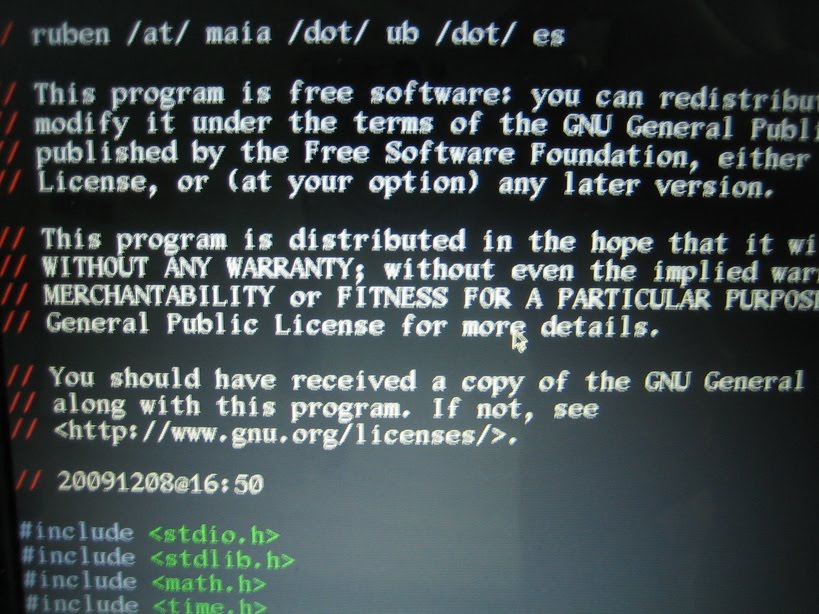
I like a lot this console font!
To configure the keyboard and font, run km. I choose, of course, the qwerty_es key map, and as for a font, one I hadn't used before and I liked a lot afterwards, ISO01-12x22. It looks very Times New Roman, very nice and big.
After that, it is the wireless moment. For me, this worked:
ifconfig wlan0 upbecause my key was WEP. If your router uses WPA passphrases, you need to use WPA_supplicant, which isn't as hard as it looks. But if it is not your router, maybe you don't know which encryption it uses... start with WEP and then go to WPA. Maybe you'll need to do the two last steps of it twice, or wait a little before issuing the dhcpd.
iwconfig wlan0 essid "myId" key "mypasswd"
dhcpd wlan0
After this, test your net with an ifconfig wlan0 and ping www.google.com. If everything works as expected, run /arch/setup. If you have DNS problems, add nameserver 8.8.8.8 to /etc/resolv.conf (Google's DNS).
The installation procedure is guided, but there are several possible pitfalls... I slipped in at least two. Well, three counting my problems in configuring the wifi connection.
First, when selecting your packages, be sure to select wireless-tools. If you don't... When the installation is complete and everything is working, there will be no networking. And you can't install any package.
Once the base packages are installed, you need to configure them. First, you will be asked which editor do you prefer: nano, joe or vi. I selected nano the first time. Just before, you will be asked to either copy the current networking configuration into the future network configuration, or leave it as is. I decided to copy... And then all configuration files you were supposed to edit with nano were empty. Moreover, nano could not write the files either. And when I selected change root password, the installer broke. Restart needed.
Once restarted, I selected vi as my editor (and I am an emacs guy... here you can find a cheatsheet) and not to copy. Everything worked out as expected, following the guidelines of the Arch Linux beginners guide. After a while, the system was working.
Tweaking started. First, some modules and daemons from Acer Aspire One in the Arch Wiki. Not everything, just one after the other to get xorg installed and working. In case you don't know, installing in Arch Linux is via pacman, with pacman -S package. You can also look for a string in the packages list with pacman -Ss package.
Once I could startx, I had to choose a display manager (you can find them in this Arch Wiki list and set-up, I went for Slim) and a window manager, which of course had to be Fluxbox. Fluxbox installation details here.
After some wrestling with .xinitrc and the like, I got it working, and realised it was the moment to adduser. I added my main user, forgot about groups and had to manually add the user to all the relevant groups, detailed here.
Now everything started to get downhill, as I had some working X. I installed the networkmanager and networkmanager-applet from Gnome, to control my wifi connections, although you have a lot of possibilities in this page for wireless set-up. Installed emacs-23.6 and firefox-3.6, checked they worked and left the rest for the following day. It is the day of package installing, configuring Fluxbox keybindings and these small and long chores.
First, as I was in my office, I needed to get working the external monitor as I like it. Before it worked somehow ok, when setting up the external resolution the laptop monitor shut down. Now, for some odd reason it didn't happen... Thus I set up WinKey+F5 to display in external monitor and Shift+WinKey+F5 to switch back to the laptop screen. In Fluxbox's keys file:
Mod4 F5: exec xrandr --output VGA1 --mode 1152x864 --output LVDS1 --off
Shift Mod4 F5: exec xrandr --output LVDS1 --mode 1024x600 --output VGA1 --off
To find out which resolutions are available to your external monitor (even for your LCD screen), plug the monitor VGA connector and issue
xrandr -q
This will give you a list of available resolutions for all devices, with its corresponding names. In case of doubt of which is the external and which the LCD, unplug and repeat: one will disappear.
Now, my computers are always on duty. This means, I need suspend on lid. To do so, be sure to add your default user to the power user group (in fact, read this list of user groups you should consider), then just read these steps. They work perfectly... Except maybe for some X problems. Do it at your own risk, of course. For me, it worked ok after xrandr was configured correctly, see above. After coming back from sleep, the external monitor will flicker. Turn back to the LCD and then again to the external monitor (just 4 keypresses and 2 seconds) and it will be solved.
Installing emacs packages was a charm using ELPA, texlive was installed in just 20 minutes (I didn't find a generic texlive with all packages, thus I had to write several texlive-stuff to get everything installed) and working in no time. The main afternoon problem was setting up networkmanager and gnome-keyring-daemon to work together. After much, much googling and changing, the solution can be found here. In broad terms, you check that dbus is running, together with the addition of
to /etc/pam.d/slim (you should change slim for your session manager) and this lineauth optional pam_gnome_keyring.so
session optional pam_gnome_keyring.so auto_start
eval $(gnome-keyring-daemon -s --components=pkcs11,secrets,ssh)
to your .xinitrc. All these three changes, together and nm-applet and gnome-keyring-daemon where happy ever after. Because writing a 16 hex digits key several times can be nerve-wrecking (I know, I know, I have it in a file, but anyway).
Then, as I checked twitter, I followed a link to youtube... Installing the flash plugin was done via pacman -S flashplugin, then I had to copy /usr/lib/mozilla/plugins/libflashplayer.so to ~/.mozilla/plugins and chmod +xr it. Then, I realised I didn't have sound enabled... A little looking around until I realised it just was that Alsa is muted by default. You can solve it with
I also added gnome-power-manager, to see my battery levels (I forgot to install it the first day... bad!). As the netbook stands, everything I need is installed and working correctly. Just 1 day more or less. And Arch Wiki and Arch Forums are fantastic places to find solutions to Arch Linux problems and configurations (beating by a wide margin Ubuntu forums).
Then, as I checked twitter, I followed a link to youtube... Installing the flash plugin was done via pacman -S flashplugin, then I had to copy /usr/lib/mozilla/plugins/libflashplayer.so to ~/.mozilla/plugins and chmod +xr it. Then, I realised I didn't have sound enabled... A little looking around until I realised it just was that Alsa is muted by default. You can solve it with
amixer set Master 90% unmuteAfter this, I wanted to be able to raise and lower the volume with the dedicated fn keys of the laptop... The proposed solution in Arch Linux wiki page on Acer Aspire One didn't work, had to change it for
I.e. remove the db after 2. This didn't satisfy me, I wanted libnotify (which I installed together with pidgin... remember to enable the pidgin notify plugin!) to tell me the volume levels. A solution I found over the web is a nice bash script called bashmixer. I modified a little the code to show volume after every operation. Maybe there is a better solution for this... Any idea?"(amixer sset Master toggle)"
m:0x0 + c:121
XF86AudioMute
"(amixer set Master 2+ unmute)"
m:0x0 + c:123
XF86AudioRaiseVolume
"(amixer set Master 2- unmute)"
m:0x0 + c:122
XF86AudioLowerVolume
"(sudo pm-suspend)"
m:0x0 + c:150
XF86Sleep
I also added gnome-power-manager, to see my battery levels (I forgot to install it the first day... bad!). As the netbook stands, everything I need is installed and working correctly. Just 1 day more or less. And Arch Wiki and Arch Forums are fantastic places to find solutions to Arch Linux problems and configurations (beating by a wide margin Ubuntu forums).
Oh, I almost forgot! I got the left hand and right hand card readers to hotplug by adding pciehp to the MODULES line in /etc/rc.conf, i.e. MODULES=(... pciehp) and creating the file /etc/modprobe.d/pciehp.conf with the following content:
options pciehp pciehp_force=1
After rebooting, both card readers will hotplug (when inserting an SD card, which is the one I use).
Related posts:
9 programming books I have read and somewhat liked... Linux is a time killer My first port to the Ben NanoNote: gnugo Power to the command line Two weeks, still loving Fluxbox Three dee (3-dimensional file system browsers review) Gcal: the ultra-powerful command line GNU calendar Acer Aspire One 8.9' + Ubuntu + FluxboxThe "Related posts" method I use involves Javascript, thus it doesn't work in the RSS feed. To view related posts, please refer to the original article. Thanks!
07/07/2010 - iPhone origami case diagrams
A few weeks ago I saw in my Google Analytics that someone came to this blog looking for "Origami iPhone case". As I have a Origami CD case, and several posts on iPhone/iPod Touch games... it was a page hit. But I thought: if I can have a neat CD case, I can also design a neat origami case for an iPhone! Said and... done. It took a few tries (and a few days), as you can see below. The main problem was that the first worked by luck, and the second, too. But the third didn't, and it took a while of disassembling to solve all problems.
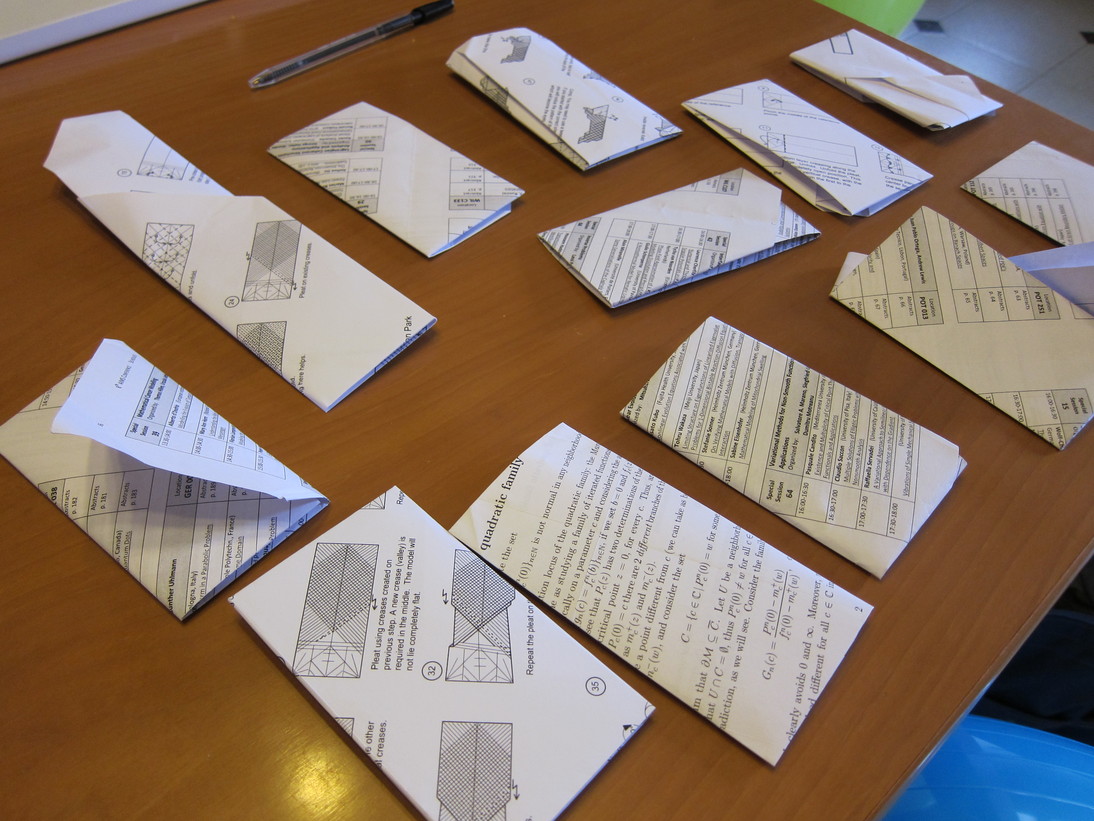
The final case is pretty nice, if I can say it, moreover by tweaking a little the size doubles as a neat bus card holder (for Barcelona's size, which is roughly the same as a credit card), with 3 pockets (one is the iPhone pocket, the other is a thin pocket for just one ticket and another larger in the front/back). You can find the diagrams below the pictures.
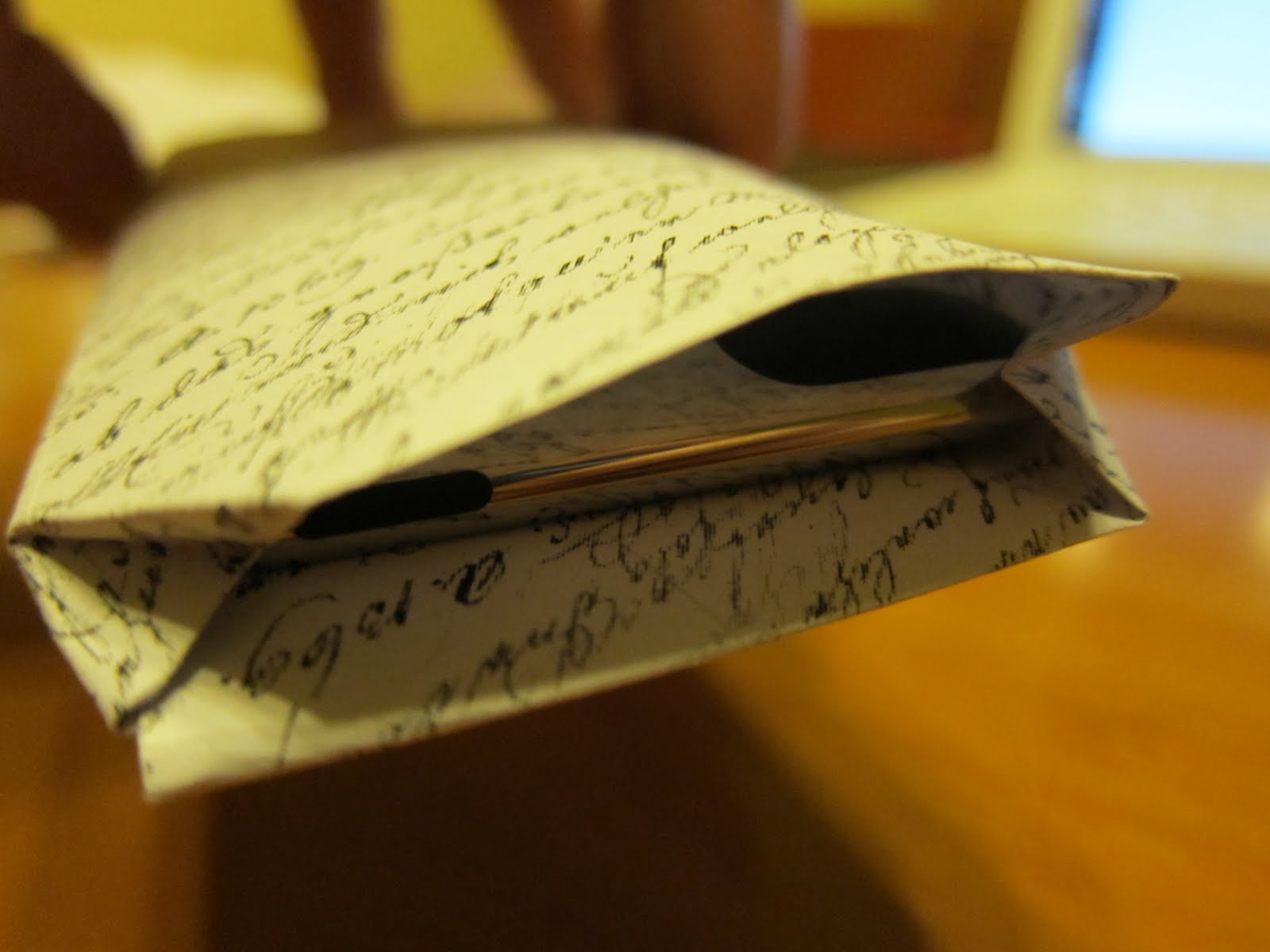

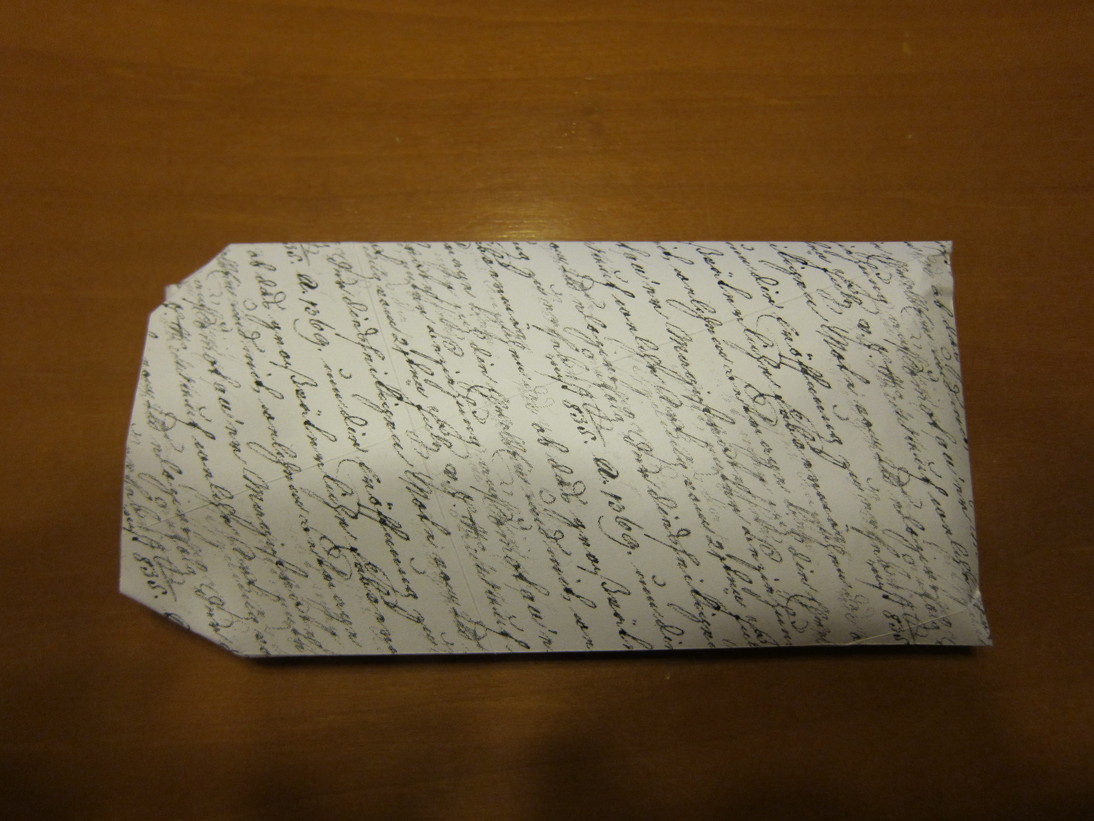
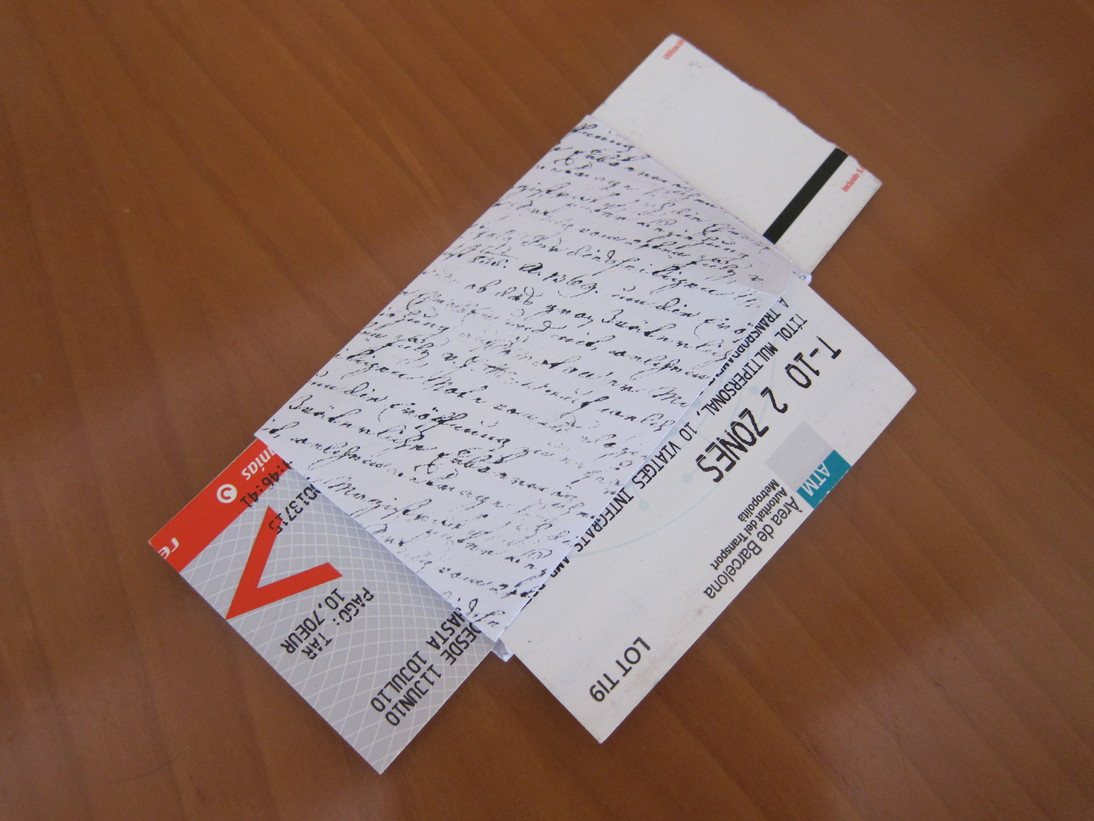

Click to enlarge!

Click to enlarge!
Related links:
Diagrams: How to do an easy origami CD case
Diagrams: Origami Flower Box
Model: Origami masks
Model: Satoshi's pegasus
Diagrams: How to do an easy origami CD case Diagrams: Origami Flower Box Model: Origami masks Model: Satoshi's pegasusThe "Related posts" method I use involves Javascript, thus it doesn't work in the RSS feed. To view related posts, please refer to the original article. Thanks!
08/05/2010 - Installed Go in Mac OS 10.5
Yes, I know it: it is easy. But I will be doing a wipe and reinstall of my MacBook, and when I need to reinstall everything I want a place to check for the steps I did. I found almost all tips needed here.
The first step is checking for Mercurial (wikipedia) in your system. Open a terminal and type
hg version
If your terminal complains about command not found, you don't have Mercurial installed. You have to install it, but prior to it you need to check your Python version. In your terminal,
python -V
will tell you which version you have. You'll have it installed, as Mac OS has it by default. In the improbable case you don't, you can install from here as a standard dmg-pkg Mac OS install. Anyway, it is a good idea to update it. After you have Python installed, you can install Mercurial from here. Beware, you need to install a version suited to your Mac OS version and Python version. If in doubt, upgrade Python and install the latest available Mercurial.
I forgot to mention that you need XCode, and all the usual development tools for Mac OS (gcc and the like). But I guess you already have all this installed if you are interested in installing go. If not, they are in your companion CD for Mac OS.
After you have all this requirements, you are ready to download the latest version of Go from the Google repositories. Open your favourite editor and open ~/.bash_profile. Add the following lines to its end
After you have all this requirements, you are ready to download the latest version of Go from the Google repositories. Open your favourite editor and open ~/.bash_profile. Add the following lines to its end
export GOROOT=$HOME/goNow, to reload your bash profile (without needing to open a new terminal window) type
export GOOS=darwin
export GOARCH=386
export GOBIN=$HOME/bin
export PATH=$GOBIN:$PATH
source ~/.bash_profile
All these variables should now be working correctly. The time to fetch go has arrived! Be sure that you don't have a ~/go directory prior to this step, as this could wipe or corrupt data in that directory.
hg clone -r release https://go.googlecode.com/hg/ $GOROOTThis step can take around one or two minutes. Once you are done, you need to create a ~/bin directory and make it executable, if it doesn't exist. If this is the case,
mkdir ~/binJust one step left
chmod 755 !$
cd $GOROOT/srcThis will take a while and write a lot of information in your terminal window. If everything worked smoothly, you will get a line saying
./all.bash
3 known bugs; 0 unexpected bugsor something along these lines.
For me something didn't work perfect the first time. The problem is that I left it compiling and walked away. When I came back I saw some error related to http tests. I Tried again later, without walking away: I have the Mac OS firewall set on ask. As I didn't answer when prompted if some test program could connect to the Internet, the connection broke and the networking tests didn't proceed. If you also have this firewall setting, you will have to allow 5 or 6 programs. I recommend that you turn off the firewall while compiling, remember to reset it afterwards.
Now, you should have a nice working Go environment. Check if the compiler and linker are to be found
which 8gIf you want to test if it works, you can find a sample hello world program here (Go homepage).
/Users/ruben/bin/8g
which 8l
/Users/ruben/bin/8l
I hope this helped your process of installing (and learning) this language.
Related posts:
 8 reader reasons for re-inventing the wheel as a programmer Approximating images with randomly placed translucent triangles 8 reasons for re-inventing the wheel as a programmer 9 programming books I have read and somewhat liked... C code juicer: detecting copied programming assignments
The "Related posts" method I use involves Javascript, thus it doesn't work in the RSS feed. To view related posts, please refer to the original article. Thanks!
21/03/2010 - Reader hints on lemon seed germination
As you may already know, I have a post (and a few follow-ups) on easy tips for lemon seed germination, which have gathered quite a few visits since I wrote them. They have also collected a few comments, with really useful tips that I want to share with you now.
Michelle Hammersmith (sorry, she didn't gave any backlink!) has a few great suggestions.
After they have a root, plant them in
29/12/2009 - Gluten-free dark brown cane sugar biscuit
What you will need:1 cup soy yogurt1 cup dark brown sugar (we used Tate&Lyle Dark Brown Sugar)1 cup gluten-free flour1/4 cup oil1 tablespoon baking powderMix well all ingredients, pour into a baking pan and put in the oven, 200ºC for 1 hour. Check very often... it is hard to tell when it is finished. It should be hard on the outside and soft on the inside, without leaving any trace on a toothpick
17/12/2009 - RCS & SVN: Version control
With GIMP's "Map to sphere"A few years ago, while I was still mainly a Windows user, I read 'Pragmatic programmer: From journeyman to master', and learnt about Version Control Systems. You know, SVN, CVS, Git, Darcs. As I was just a single user working locally (just wanted the incremental and logged backups), I installed RCS. Almost the oldest, and in some sense the most simple. It can work
11/12/2009 - SBSettings for jailbroken iPhone/iPod Touch
After buying my iPod Touch and playing a little with it, I realised that battery life was a problem, with the WiFi always on. Thus, I was always bringing up Settins-WiFi and turning on and off. There was no easy and quick way to do it... Until I jailbroke it. I installed SBSettings, and its first use was that. Swipe the upper status bar, and the menu shown above appears. One tap and I can kill
29/11/2009 - iHold
Right: middle line, left top lineIn this post I will explain how to recycle an old credit card to build a stand for your iPod touch / iPhone. You can choose from 3 designs, depending on your preferred inclination. Here is what you will need:A printed version of the shape. Scroll down for the jpg'd versionA cardScissorsSomething to writeA small fileCut the model, and use your writing instrument
07/11/2009 - Lime pie recipe
Tastes great!2 ripe avocados1/2 cup coconut milk2 tablespoons vanilla (or vanillated sugar)3/4 cup agave syrup (or sugar syrup)1/2 cup lime juice1/8 tablespoon salt3/4 cup coconut butter (or coconut oil)pie crust (below a recipe for it)Mix all the ingredients (except the pie crust) in a blender.180 gr plain cookies200 gr butterMelt the butter and crush finely the cookies. Mix and place in the
03/11/2009 - External rays & Lavaurs algorithm
As you may remember, I spent quite some time this August with Lavaurs algorithm for the topological identification of the circle corresponding to the Mandelbrot set. After that, I spent quite some more trying to do pictures of external rays to show side by side. I was not able... and then found Mandel.Really nice program, with lots and lots of options (and I met the programmer, which happens to
02/11/2009 - Scribus for mathematical posters
As you may already know, I presented a poster at a conference recently, and did the set up with Scribus, the texts with LaTeX with the Beamer and Beamerposter packages.Setting upThe first piece of advise, is to set page guides where needed (in the Page menu, you can put them at a certain numerical place, and then move them along) and then Snap to guides in the same menu. This way, you can move
03/10/2009 - Ginger germination
When bought, and after a week. Plate+water
A few weeks ago, I entered an asian supermarket, and saw that nice piece of ginger root (in fact, rhizome, not root), with something that looked like a potato eye. I wondered it that meant that ginger could be grown easily... bought it and googled it. Turned out ginger is really easy to grow, the Internet said. And I tried, and it is far easier. First
01/10/2009 - Fading images in Javascript
CicleImatges()
Source code:
// Copyright 2009 Rubén Berenguel
// ruben /at/ maia /dot/ ub /dot/ es
// This program is free software: you can redistribute it and/or
// modify it under the terms of the GNU General Public License as
// published by the Free Software Foundation, either version 3 of
// the License, or (at your option) any later version.
// This
23/09/2009 - Calendars & emacs
My month, startingFor the last two years, I have been really happy, living without a definite calendar. I just knew I had a meeting with my boss "next Monday", or had a workshop somewhere "in the last weeks of January". But these days I've come to realize I just need a calendar now... And finally managed to mix org-mode's events with standard emacs calendar+diary views. This calendar is emacs
23/09/2009 - Whistle control your computer (Linux&Mac)
From flickrSome time ago, I stumbled into this lifehacker page, suggesting a IBM-developerWorks tutorial on how to install a few things to your system to be able to... whistle control your computer. Whistle a tune, open Firefox. These things. As geeky as I am, I had to try it. Small problem: the tutorial is for Linux/Windows and I was on a Mac. Big problem: it turned out to be slightly outdated,
23/09/2009 - Slicing scannings
Last year our department got a nice and shiny Xerox WorkCentre, with scan+mail capabilities. Wonders of technology, now I can scan those chapters I use from books that weigth tons. But... of course, the machine scans two pages each time, and thus creates a double bound PDF.And this doesn't work well with my way to print booklets, so a working solution was to use ghostscript and ImageMagick from
23/09/2009 - Screenshot via command-line in Linux
Have you ever wondered how to take a screenshot remotely, via the command line in a Linux system? Here is a way to do it. At the bottom you can also find a script to move it to the root of your personal page (if you have) to open the screenshot in your browser.I have a Lisp program running inside Slime (The Superior Lisp Interaction Mode for Emacs) in an emacs instance running in my office


